Industry solution / Education
Procure-to-Pay for Education
Give faculty and staff an easy way to find approved supplies and services while carrying school, department, and funding context through approvals, orders, and invoices. Help the business office see what was requested, who approved it, and where it belongs.
- Approved supplier choices
- Configured approval paths
- Connected purchasing and AP
Built around your reality
Many occasional buyers across departments
Tight budgets and varied funding sources
Audit questions that arrive months later
The education buying reality
The person who needs it rarely lives in procurement software.
A teacher needs classroom materials. A lab needs supplies. Facilities needs a repair. These requests start in different schools and departments, but they meet in one business office. When the path is unclear, staff buy around it and finance has to reconstruct the supplier, approval, funding code, and invoice later.
Occasional buyers need a clear starting point.
Make contracted suppliers and the right request path easy to find without asking staff to memorize procurement policy.
Funding context cannot be added as an afterthought.
Capture the school, department, fund, grant, or project fields your institution uses when the request begins, subject to configuration.
The business office needs the whole record.
Keep the request, approval, PO, receipt, and invoice connected so AP can review exceptions with context.
A connected campus process
Make the approved buying path the easy path.
Vroozi gives staff a straightforward place to begin and carries the relevant approval and financial context forward.
Start with approved suppliers, catalogs, and contract choices.
Capture school, department, fund, project, and purchase purpose as configured.
Route based on the institution’s policy and financial rules.
Create POs and record receipt of goods or services.
Review matches and exceptions, then analyze purchasing by relevant fields.
See Vroozi in action
From a classroom request to a clearer financial record.
For faculty, staff, and business-office teams, these views connect approved suppliers, school and funding context, order status, and AP follow-up in one buying experience.
Approved suppliers for schools and campuses.
Give occasional buyers an easy way to browse available supplier and catalog choices for classrooms, labs, and facilities before they create a request.

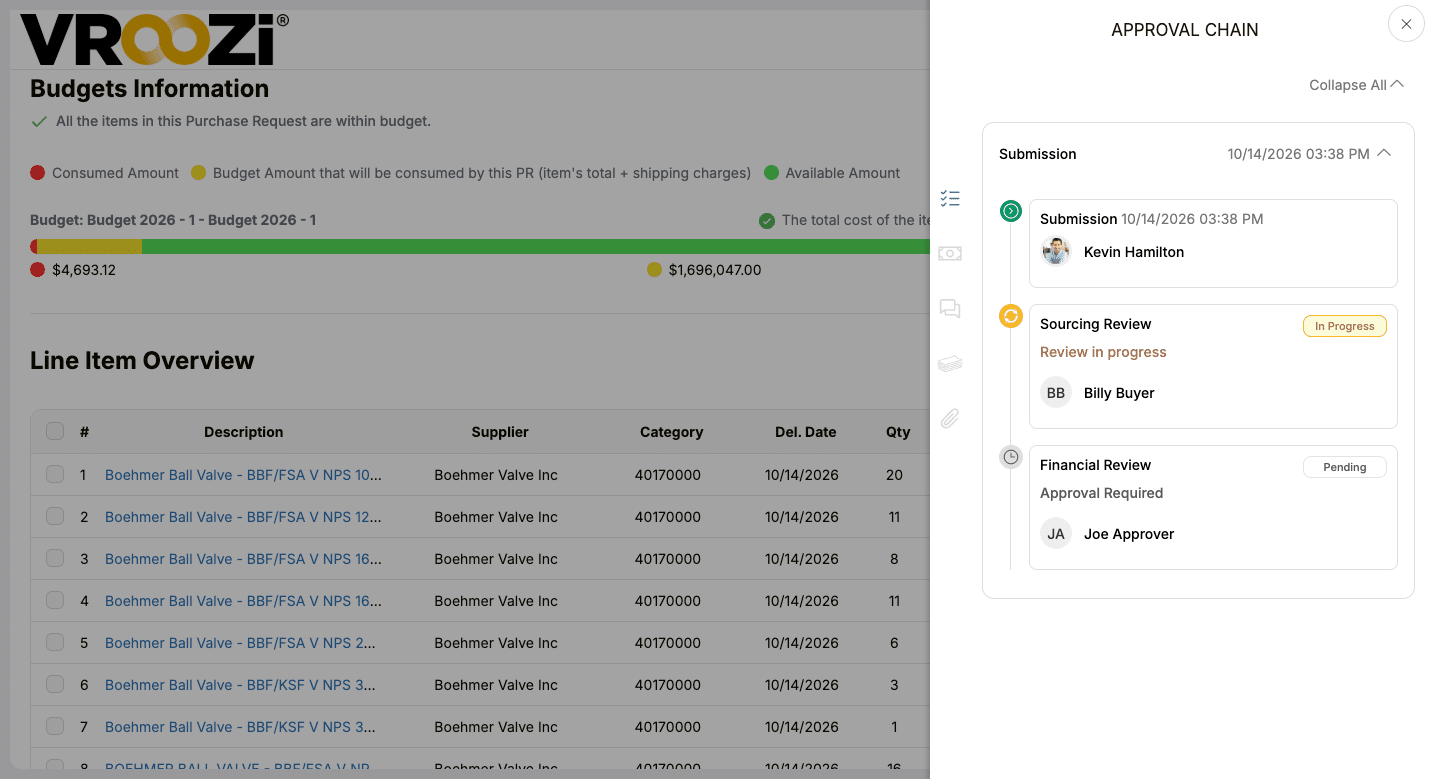
Put school and funding context in front of the approver.
Show the configured school, department, fund, or project details with the request so reviewers can see why a purchase is needed.
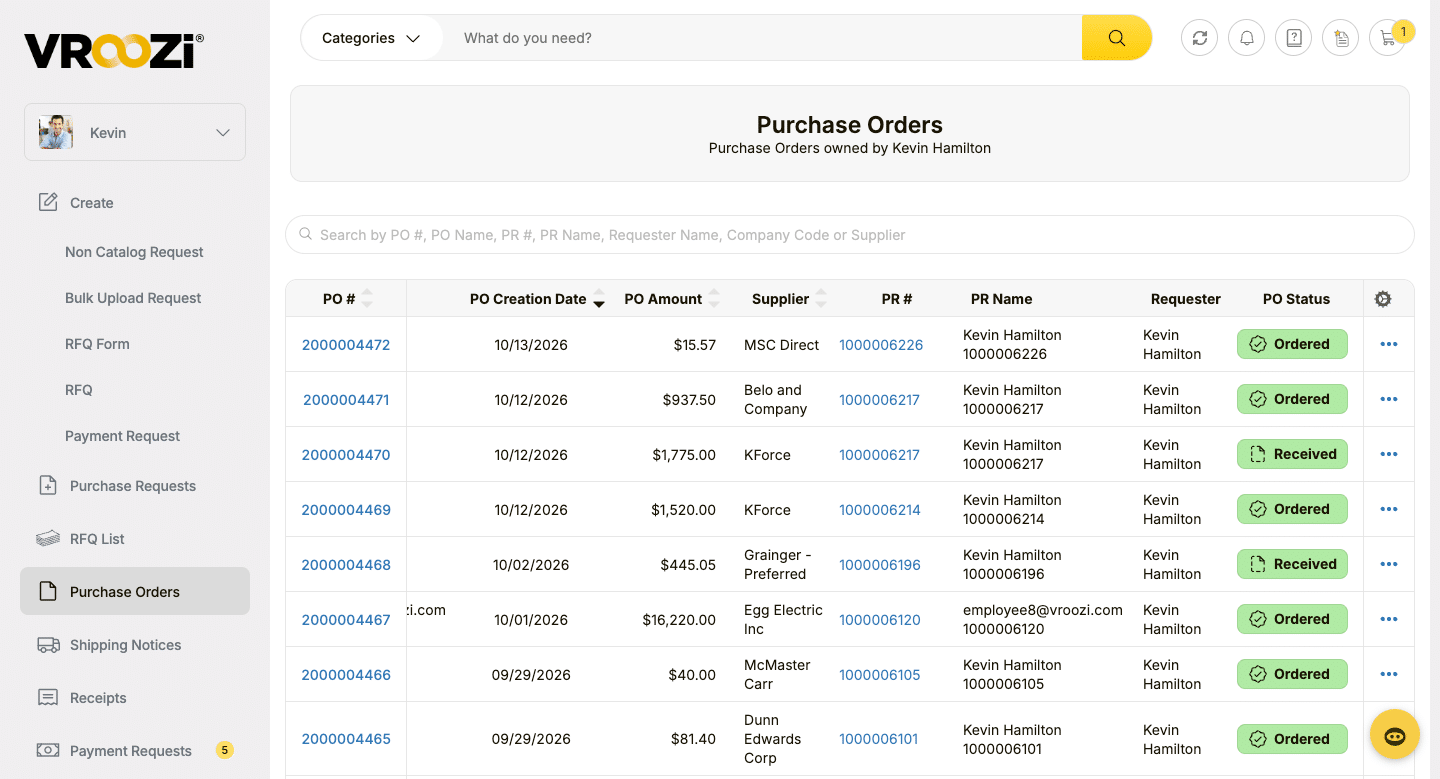
Follow the order after approval.
Purchase order details and status sit in one view, giving users a shared record of what was ordered and where the order stands.
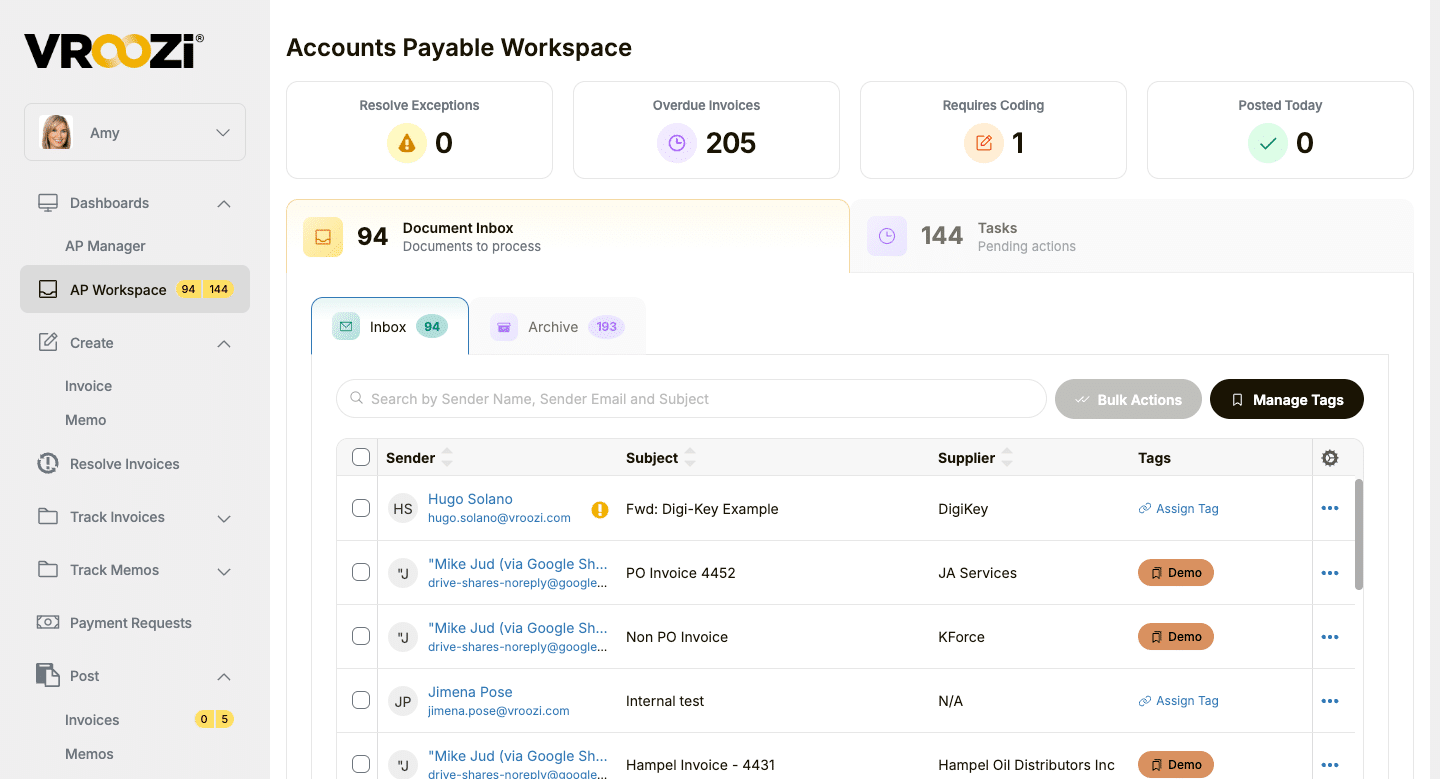
Give AP a clear next action.
See invoice inbox items, coding needs, overdue invoices, and pending tasks in one workspace. Custom tags help AP organize incoming invoice documents so teams can find and work the right items faster.
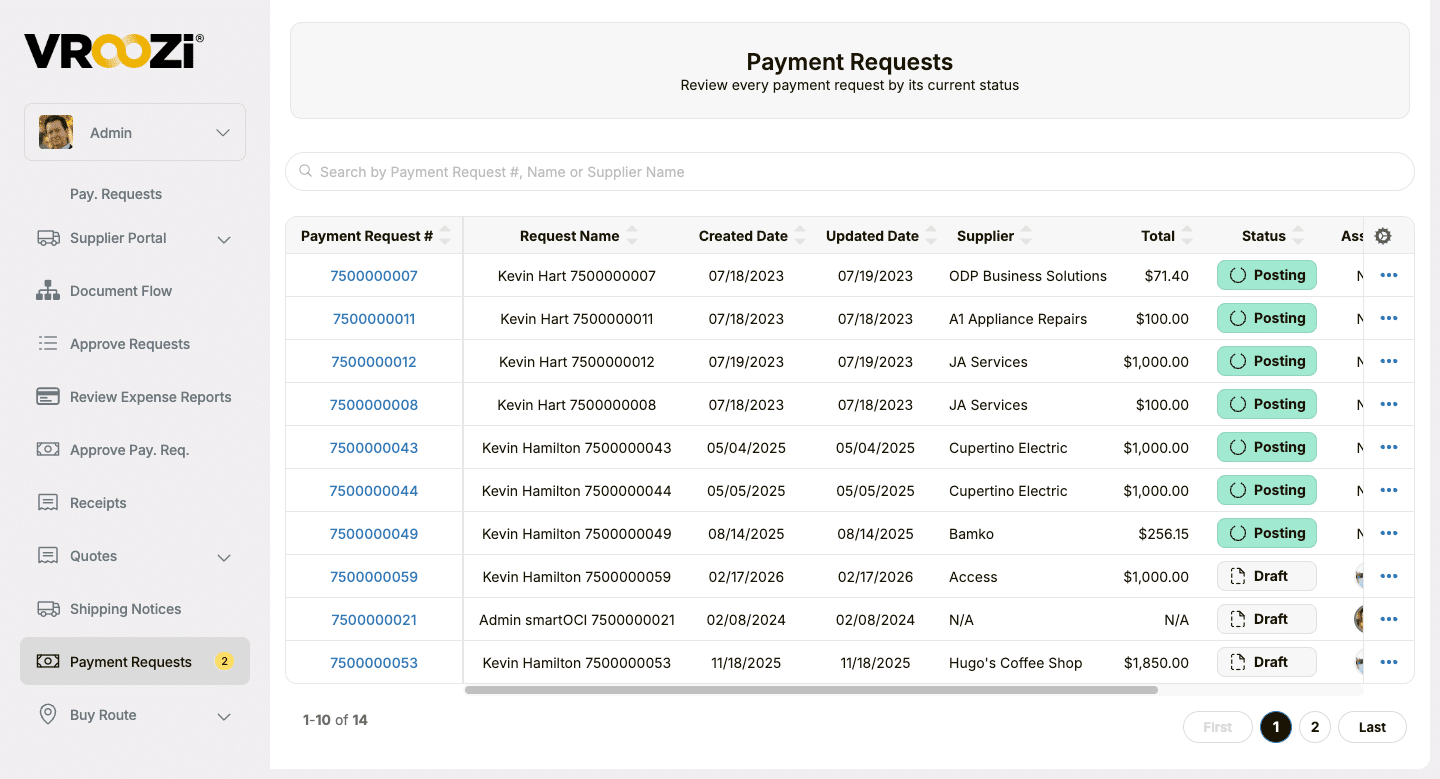
See where a payment request stands.
Review requests by supplier, amount, and current workflow status, including Draft and Posting, so finance can identify what needs follow-up.
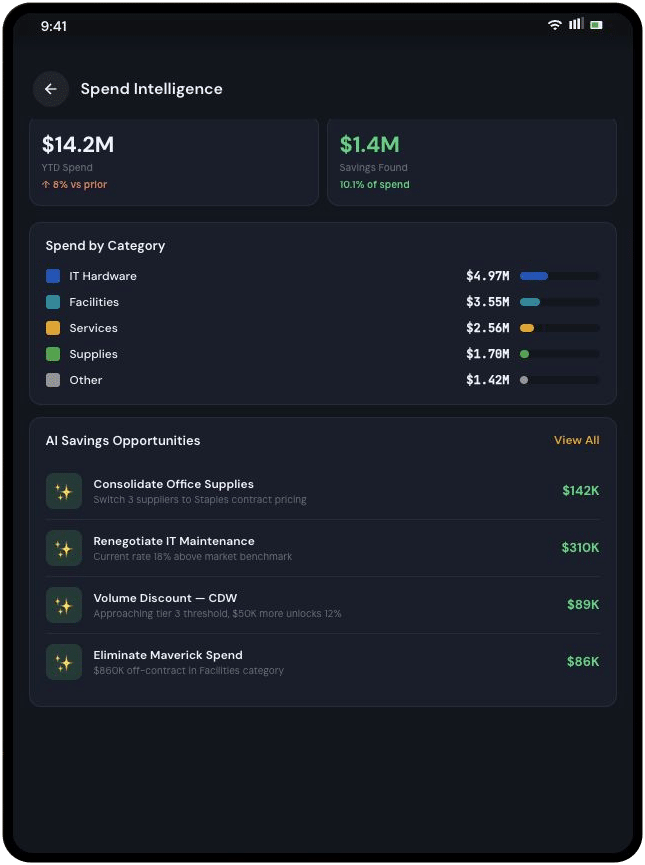
See buying patterns across schools and departments.
Review supplier and category activity alongside the organizational fields your institution captures, so teams can discuss where an approved option or better buying path may help.
One process, different roles
Useful to the whole institution.
Good education procurement supports the mission without asking every faculty or staff member to become a purchasing specialist.
Get what teaching and operations need.
Find approved supplies and services through a straightforward buying experience.
Guide buying at scale.
Make preferred suppliers and contract options visible across departments and sites.
Keep the funding story intact.
Use approval, PO, receipt, and invoice records to answer spend and exception questions.
Support existing finance systems.
Connect buying with the institution’s ERP and configured organizational fields.
Built for your existing systems
Connect campus buying to the financial system you already use.
Vroozi works alongside an institution’s ERP or financial environment. It supports integrations with systems such as SAP, Oracle, NetSuite, Microsoft Dynamics, and other ERPs. The data exchanged, including school, department, fund, and project fields, depends on your configuration and integration design.
- Department and funding fields
- Purchasing and AP records
- Existing financial controls
Education customer testimonial

Lycée Français de New York gained transparency and control.
In its testimonial, Lycée Français de New York describes moving from manual purchasing to a centralized process, faster approvals, and better visibility into spending. Hear how the team uses Vroozi to support buying across the school.
Frequently asked questions
How it works for education teams.
Answers to common questions from school, campus, procurement, and finance teams.
Is Vroozi suited to both K–12 and higher education?
Vroozi’s procure-to-pay capabilities can support purchasing across schools, departments, and campuses. The supplier experience, user roles, approval rules, and financial fields should be configured for the institution’s operating model.
How do faculty and staff find approved suppliers?
Preferred suppliers, hosted catalogs, and punchout options can be presented in a searchable marketplace. Procurement determines which choices are available to each buying group.
Can approvals vary by school, fund, project, or amount?
Approval routes are configurable. The fields captured on a request and the rules that use them depend on the institution’s setup and financial system design.
Can we use this for grant-funded purchases?
Grant or project identifiers can be captured when configured. Vroozi does not determine whether a purchase is allowable under a grant; the institution’s policies and review process do that.
How are POs and invoices connected?
An approved request can produce a PO, and the organization can record receipt. AP can compare invoice details with the PO and receipt where matching is part of the configured workflow.
Can staff follow a reimbursement or payment request?
Payment requests have workflow statuses that teams can use for follow-up. The exact process depends on the institution’s configuration; a request status should not be described as proof that funds were disbursed.
Does Vroozi replace our ERP or student information system?
Vroozi supports purchasing and AP workflows and can connect to an existing financial system. Student information systems are outside this page’s purchasing scope.
See what it could look like
Make the approved path easier for every campus buyer.
Show us how supplies, services, invoices, and payment requests move through your institution today. We’ll walk through the buying experience and the approval and financial context your team needs.
Keep exploring
Explore the next piece of your P2P plan.
Explore the education guide, a customer testimonial, and the Vroozi capabilities behind the process.
Industry guide
A closer look at education procurement.
Explore practical considerations for school and campus purchasing and AP.
Customer testimonial
See how one school gained purchasing visibility.
Watch Lycée Français de New York describe centralized purchasing, faster approvals, and spend visibility.
Solution / Marketplace
Put approved suppliers where staff can find them.
Explore guided buying, hosted catalogs, and punchout suppliers.
Solution / Procure-to-pay
Connect requests through payment.
See Vroozi’s purchasing, approvals, AP, and payment capabilities.