Industry solution / Retail
Procure-to-Pay for Retail
Keep stores ready for business. Vroozi connects non-merchandise purchasing across stores, distribution centers, and headquarters, giving teams access to approved suppliers while procurement and finance keep budgets, approvals, orders, and invoices in view.
- Approved supplier buying
- Location-aware approvals
- Connected purchasing + AP
Retail operations deskRequest to record
One location need, one connected record
The store gets what it needs. Finance keeps the context.
- 01FindApproved supplier
- 02RouteLocation + budget
- 03RecordOrder + invoice
- Supplier pricing
- Negotiated options available
- Approval path
- Defined for the purchase
- Invoice + receipt
- Connected for AP review
Built around retail operations
Stores, distribution centers, and HQ
Fixtures, IT, supplies, and services
Location detail behind operating spend
The retail operating-spend challenge
A store purchase should not create extra work for the whole business.
Fixtures for a reset, an IT replacement, or a facilities service can start with a local need. Without a shared buying path, requesters spend time finding suppliers, approvers lack context, and AP has to connect invoices to what was ordered and received.
Preferred suppliers need to be easy to find.
Put enabled catalogs and negotiated options in the buying experience so local teams know where to start.
Local buying still needs budget control.
Attach the store, department, and cost-center details to the request, then route it through the configured approval path.
The invoice needs more than a vendor name.
Keep order and receipt information available to AP so reviewers can work matching exceptions with the purchase record in view.
The Vroozi approach
Connect everyday retail buying from request to invoice.
Give store, distribution-center, and headquarters teams a consistent process for operating purchases, with supplier choices and controls defined by procurement and finance.
Find & choose
Start with approved suppliers, enabled catalogs, and negotiated pricing.
Request
Capture the item or service with store, department, and cost-center context.
Approve
Apply configured role, budget, and policy routes before the purchase proceeds.
Order & receive
Create the purchase order and record goods or service receipt where applicable.
Invoice & analyze
Match invoices to orders and receipts where configured, review exceptions, and analyze captured spend.
See Vroozi in action
Give local teams a simple path. Give finance a connected record.
These views show how approved supplier access, purchasing controls, order visibility, and AP workflows support the non-merchandise purchases that keep a retail business running.
01 / FIND & CHOOSE
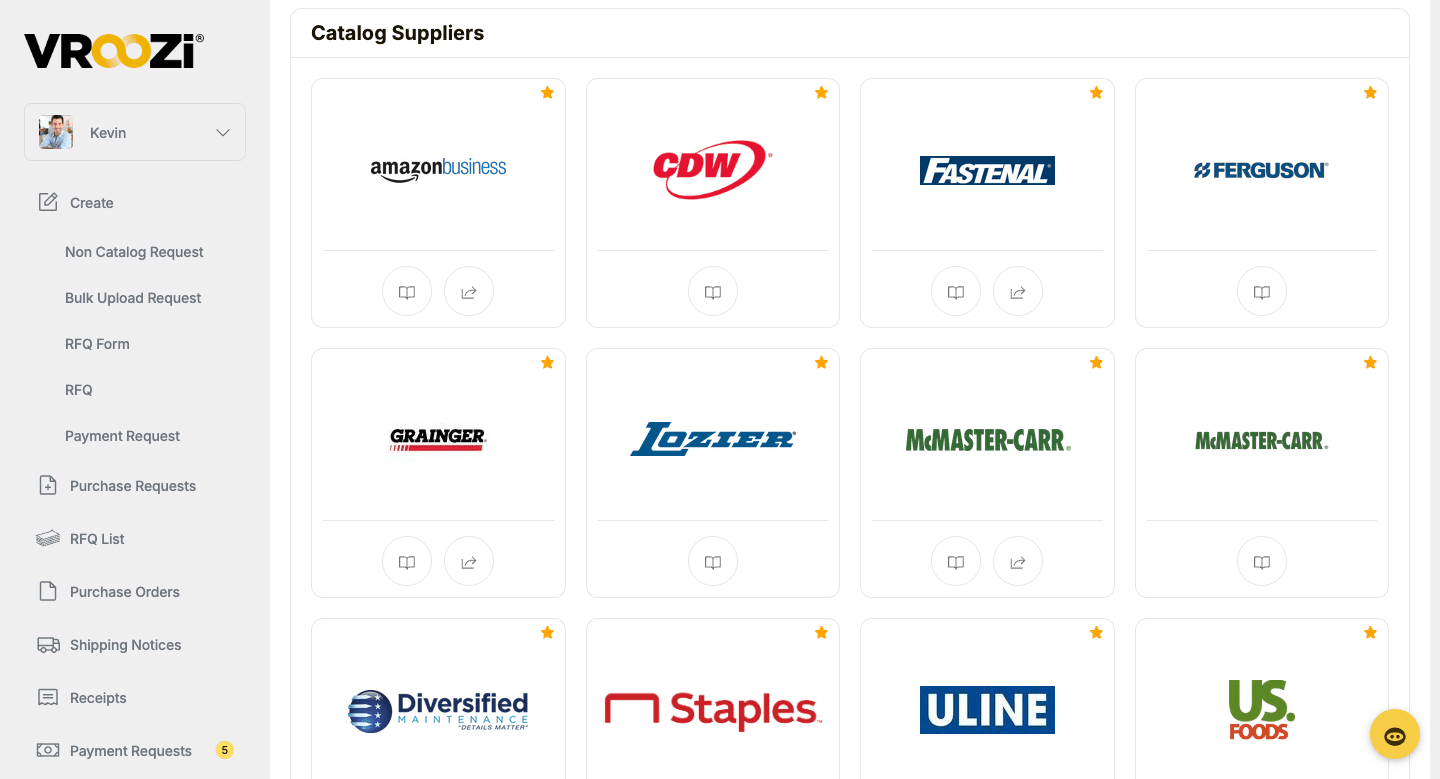
Put approved options within reach of every store.
Help store, distribution-center, and headquarters teams find enabled suppliers for fixtures, displays, IT, operating supplies, and services.
02 / REVIEW & APPROVE
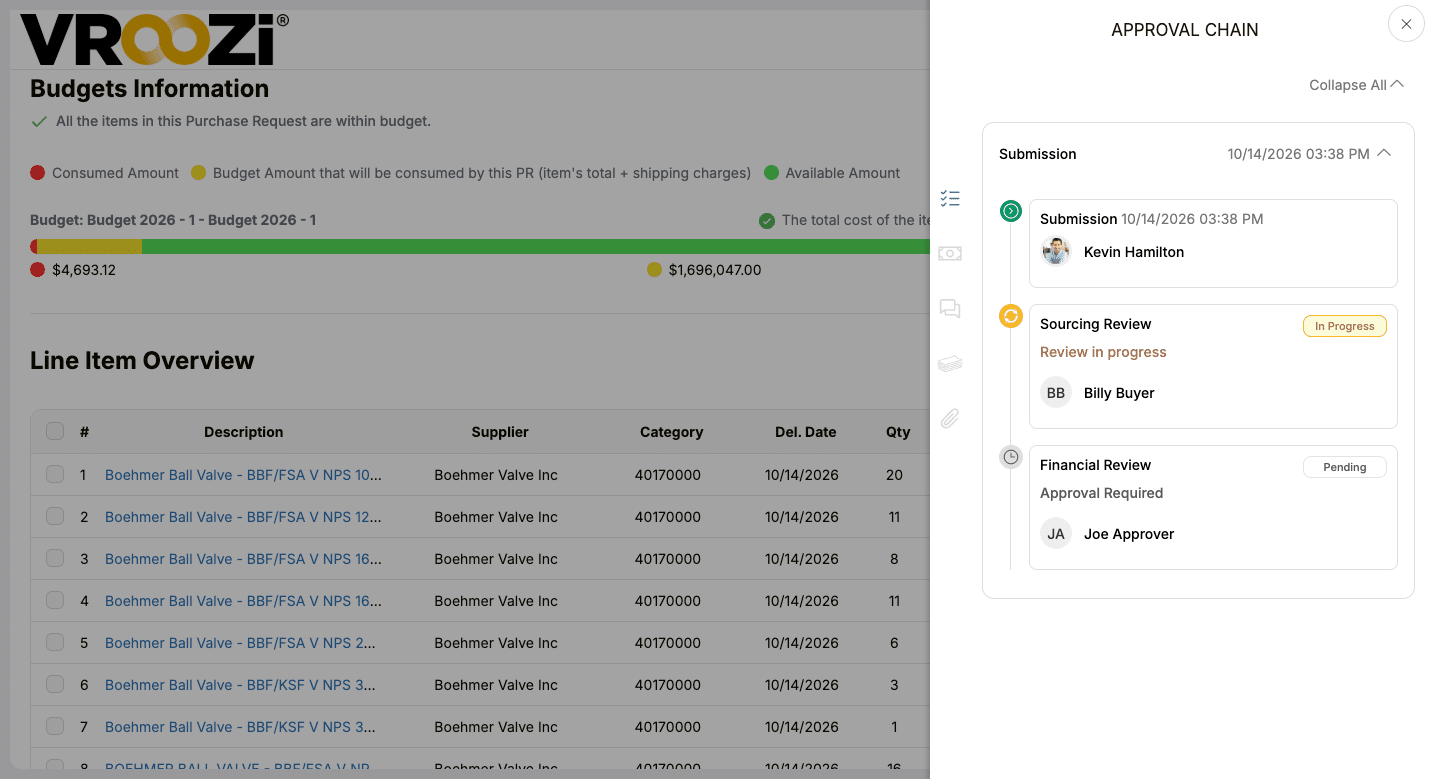
Bring the store and budget into the approval.
Show purchase details, budget information, and approval steps together so reviewers can assess the request in its location and financial context.
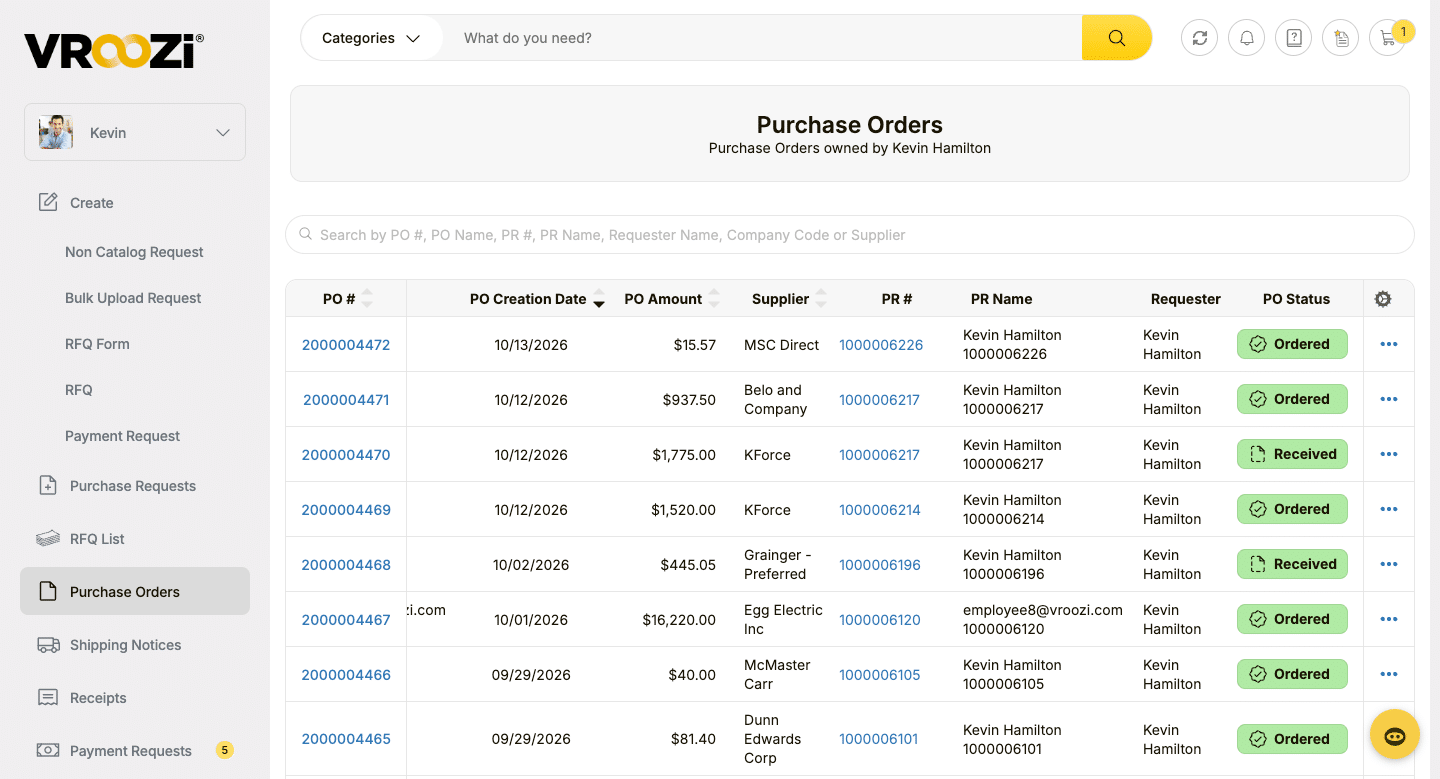
03 / ORDER & TRACK
Keep the order visible across teams.
See supplier, purchase order details, and status in one view so requesters, procurement, and finance can follow what was ordered and where it stands.
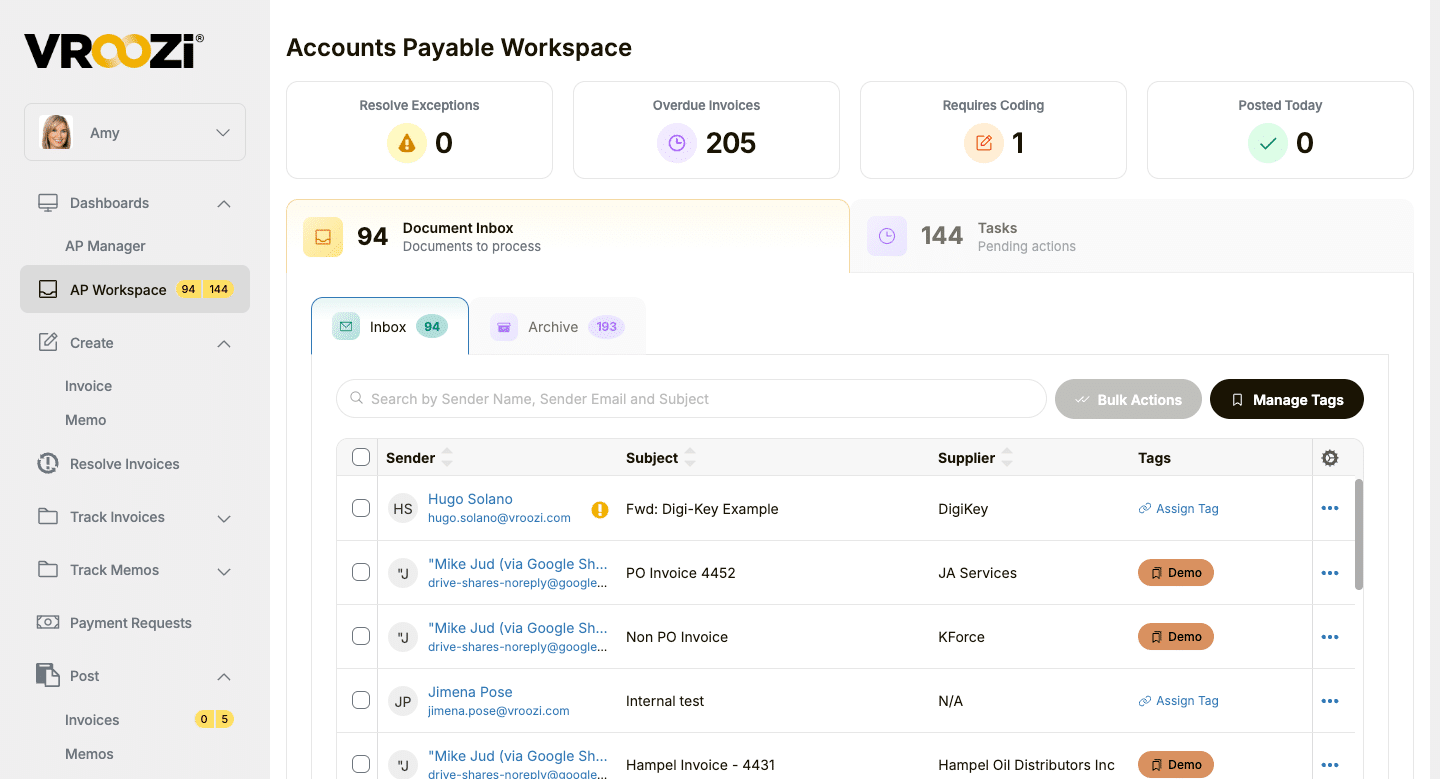
04 / WORK THE INVOICE
Help AP find the work that needs attention.
Bring invoice inbox items, coding needs, overdue invoices, and pending tasks into one workspace. Custom tags help organize incoming documents for review.
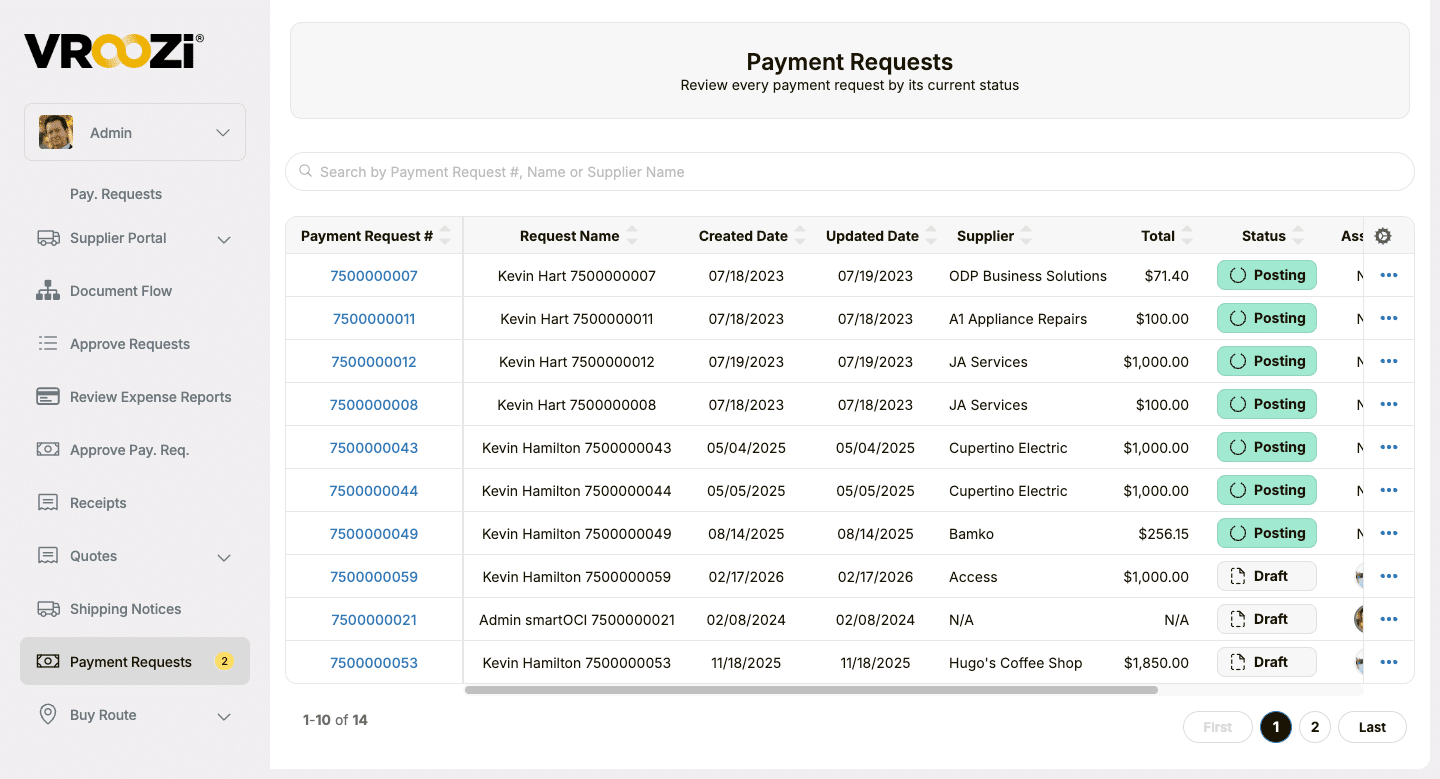
05 / FOLLOW THE REQUEST
Follow the payment request through its workflow.
Review supplier, amount, and current status, including Draft and Posting, so finance can see which requests need follow-up.
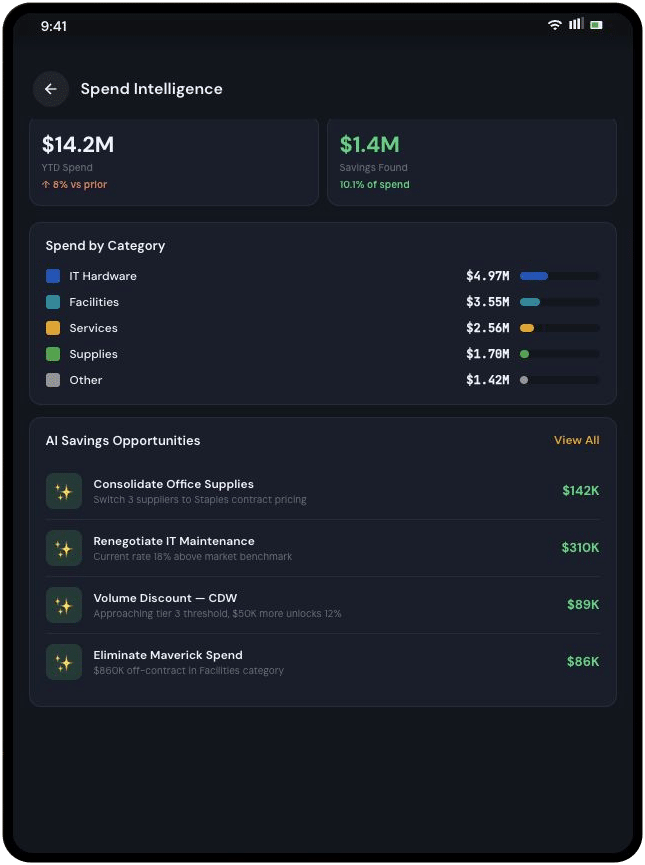
06 / SEE THE PATTERNS
See operating-spend patterns across locations.
Compare captured supplier, category, location, and cost-center data to identify repeated purchases and opportunities for better supplier agreements or catalogs.
One process across the retail business
Support the teams behind every store.
A usable buying experience helps local teams get started while keeping procurement, facilities, IT, and finance connected to the purchase.
Store + DC teams
Start with approved choices.
Request operating supplies and services with the location details attached, without hunting across disconnected supplier sites.
Facilities + IT
Keep stores ready.
Route requests for fixtures, displays, equipment, maintenance, and services through the buying process your business defines.
Procurement
Guide buying across locations.
Manage enabled suppliers, catalogs, negotiated options, and purchasing rules for stores and headquarters.
Finance + AP
Follow operating spend.
Review invoices with order and receipt context and compare captured spend across locations, departments, and suppliers.
Connected to your financial systems
Keep your retail systems. Connect the purchasing work around them.
Vroozi works alongside ERP and financial systems to connect purchasing and AP data. Define the supplier, location, department, and cost-center information your organization needs to exchange, with integration scope matched to your environment.
Your inventory, merchandising, and POS systems keep their roles. Vroozi supports the operating-purchase process around the stores and teams that use them.
Vroozi buying ↔ Your ERP
- Approved supplier and catalog access
- Requisition and approval workflows
- Purchasing and AP data connected with financial context
Multi-location customer story
VASA Fitness gave clubs more buying flexibility.
Across more than 60 fitness clubs, VASA needed a purchasing process that could keep pace with local needs. With Vroozi, clubs moved from ordering once a month to ordering as needed, with automated approvals and budget controls.

Less manual work. More control.
VASA reports saving more than 10 hours each month on manual approvals while giving teams clearer visibility into spending across locations.
Where Vroozi fits
Manage the spend that keeps stores running.
Vroozi connects non-merchandise purchasing for store operations, fixtures and displays, IT, facilities, distribution centers, and headquarters. Give teams a common path to approved suppliers, purchase requests, approvals, orders, and invoices.
Your team defines the categories, budgets, location fields, approval rules, and financial connections. Inventory replenishment, merchandising, and point-of-sale work continue in your existing retail systems.
Frequently asked questions
Retail procurement questions, answered.
How Vroozi fits store operations, supplier choices, budget approvals, invoice processing, and the retail systems you already run.
What is retail procurement software?
Retail procurement software helps stores, distribution centers, and headquarters manage purchases from suppliers through approvals, orders, receipts, invoices, and payment workflows. Vroozi supports non-merchandise and operating purchases, with location and financial context connected to the transaction.
What retail purchases can Vroozi support?
Vroozi supports non-merchandise purchases such as store supplies, fixtures and displays, IT equipment, facilities services, maintenance items, and headquarters or distribution-center needs. Your team controls the suppliers, categories, catalogs, and buying paths available to each location.
Can stores buy from approved suppliers at negotiated prices?
Yes. Vroozi brings enabled suppliers, hosted catalogs, punch-out options, and negotiated pricing into a guided buying experience. Procurement defines which options are available so store teams can start with approved choices.
Can purchase approvals vary by store, department, or budget?
Yes. Vroozi supports configurable approval workflows based on roles, budgets, policies, and purchase details. Requests can carry store, department, and cost-center information so the right reviewers can assess the purchase in context.
Can Vroozi match invoices to purchase orders and receipts?
Yes. Vroozi supports matching invoices against purchase orders and receipt records where configured, helping reduce manual matching work. AP teams can review exceptions with the purchasing context available, while non-PO invoices follow a defined review workflow.
Can finance compare operating spend across retail locations?
Yes. Vroozi helps finance compare operating spend using captured purchasing and invoice data. Reporting can include location, department, category, supplier, and cost center, based on the fields captured through your workflows and integrations.
Does Vroozi replace our POS, inventory, merchandising, or ERP systems?
No. Vroozi supports purchasing and AP for operating spend alongside your existing POS, inventory, merchandising, and ERP systems. Your retail applications retain their roles, and integrations are scoped to the financial data and workflows your environment requires.
See retail purchasing in Vroozi
Bring local buying and operating-spend control into one process.
Show us how a store or headquarters purchase moves today. We’ll walk through your supplier choices, location fields, approval paths, invoice workflow, and ERP connections.
Keep exploring
Plan a more connected retail buying process.
Use the retail overview and product tour to explore the process, then go deeper on purchasing and AP automation.
Retail solution overview
Keep store operations and finance connected.
Explore approved buying, budgets, approvals, and invoices across your retail locations.
Product tour
See the buying experience for yourself.
Explore guided buying, purchase requests, and approval workflows before your demo.
Solution / Procure-to-pay
Connect the complete purchasing cycle.
See how Vroozi brings buying, approvals, invoicing, and payments into one P2P process.
Solution / Accounts payable
Get more context into every invoice.
Learn how invoice capture, matching, and AP workflows fit into the process.
Recognized on G2
A buying experience people want to use.
Vroozi’s G2 recognition reflects feedback across implementation, setup, results, and adoption. See what reviewers say about working with Vroozi.