Industry solution / Oil, Gas & Energy
Procure-to-Pay for Oil, Gas & Energy
When a field crew needs a part, a plant needs a repair service, or a facility needs supplies, the buying path should be clear. Vroozi helps teams start with approved suppliers and carry the request, approval, order, receipt, and invoice context through to finance.
- Field and facility buying
- Configurable approvals
- ERP-connected purchasing
Built around your reality
Field needs do not wait on an inbox
Site context matters to approvers
AP needs the purchase story
The energy buying reality
The need starts in the field. The paperwork should not scatter across teams.
A technician needs a replacement fitting, a maintenance lead needs a contractor, and a facility needs safety supplies. The urgency is real, but an email, a supplier site, and a separate invoice inbox leave procurement and AP piecing together what happened.
A routine part becomes an urgent search.
Help requesters find the suppliers and catalog items procurement has enabled for tools, parts, consumables, and services.
Local context gets lost in central review.
Capture the site, project, cost center, and other configured fields with the request so approvers can see why it is needed.
The order and invoice do not tell the same story.
Keep the PO and receipt available during invoice review, and route exceptions to the people who can resolve them.
The Vroozi approach
A clear path from field request to financial record.
Vroozi supports the purchasing and AP steps around operational work. Teams can shape supplier access, approvals, and data exchange around their own sites and systems.
Find an approved supplier or catalog option.
Add item or service details and the relevant location or project context.
Route the request under configured approval rules.
Issue a PO and record goods or service receipt where the workflow calls for it.
Review invoice matches and exceptions, then examine purchasing patterns across sites.
See Vroozi in action
Give field teams a usable starting point. Give finance the full trail.
For field, procurement, and finance teams, these views connect approved suppliers, site and project context, approval paths, order status, invoice work, and spend visibility in one buying experience.
01 / Find & choose
Give field teams a clear place to start.
Bring enabled suppliers and catalog options for replacement parts, tools, safety supplies, and services into one buying entry point for site and field teams.

02 / Review & approve
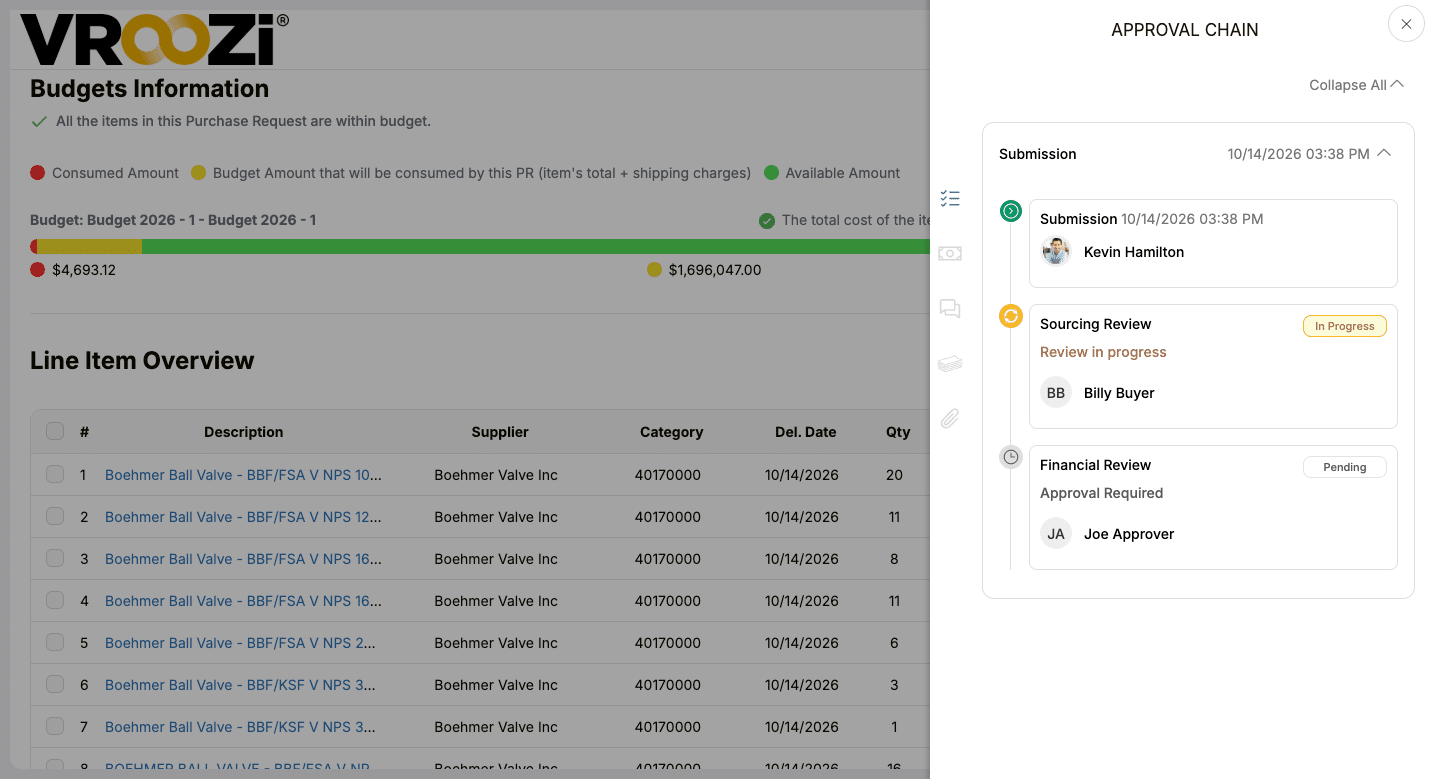
Make the approval path visible.
A request view brings budget information and approval steps together so reviewers can see where a purchase stands.
03 / Order & track
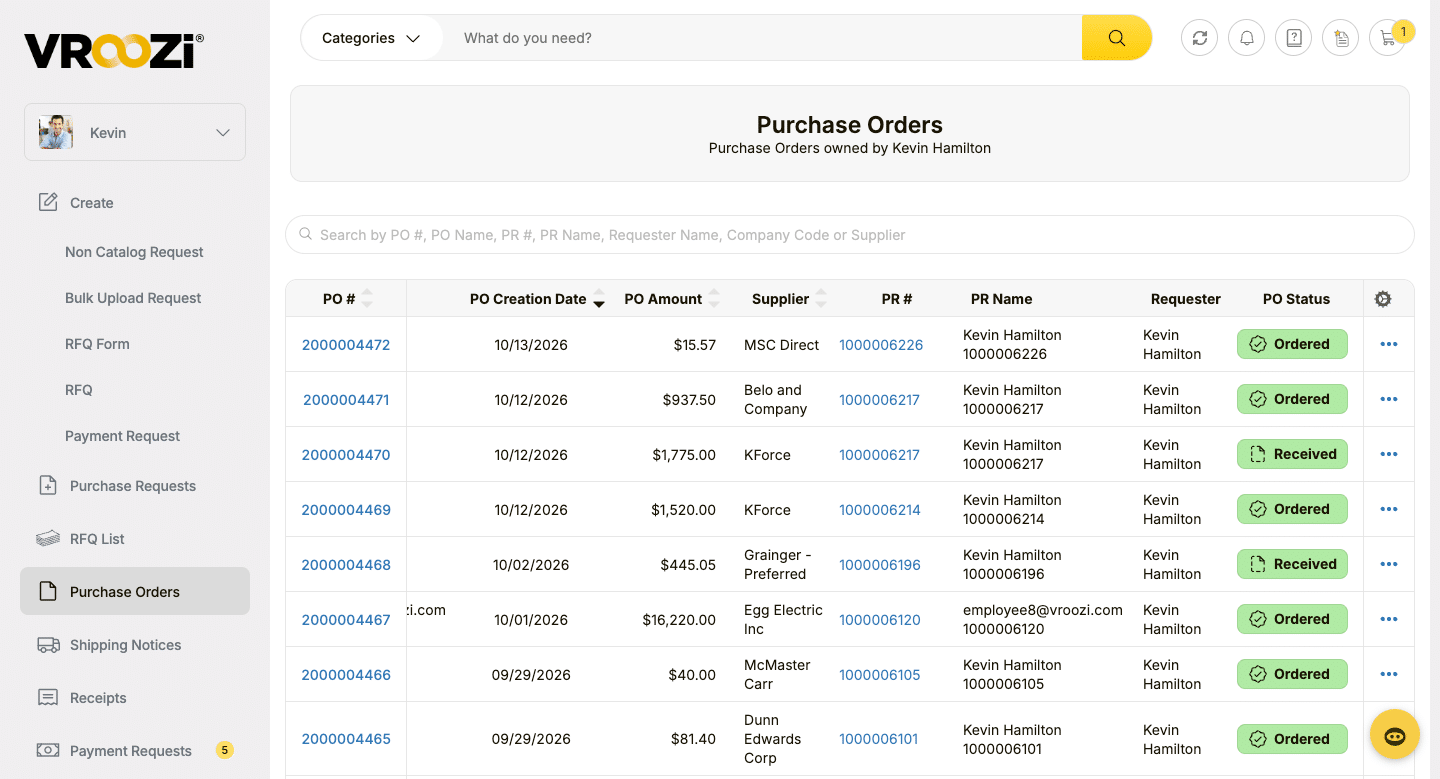
Follow the order after approval.
Purchase order details and status sit in one view, giving users a shared record of what was ordered and where the order stands.
04 / Work the invoice
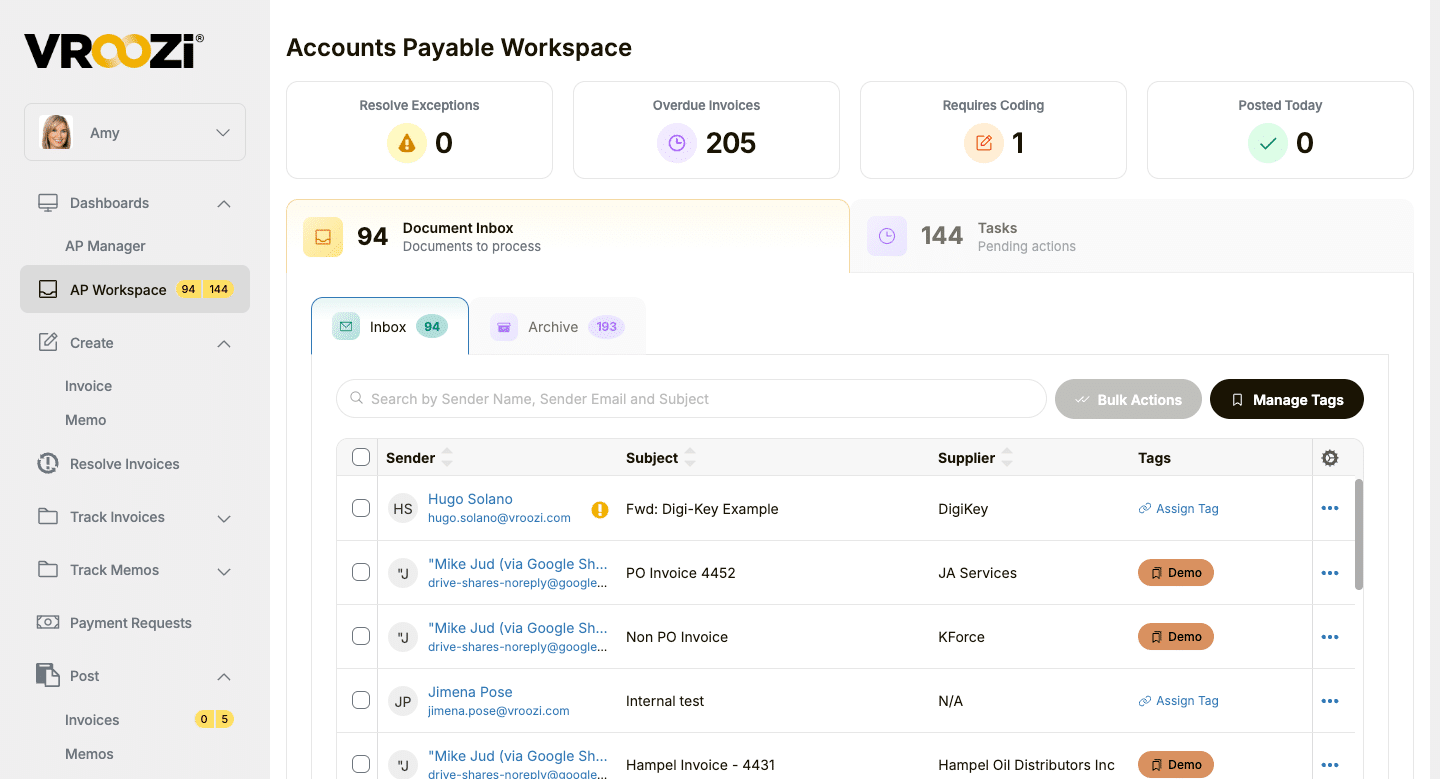
Give AP a clear next action.
Bring incoming invoices, coding needs, and pending work into one AP workspace so exceptions can be handled with the related purchase in view.
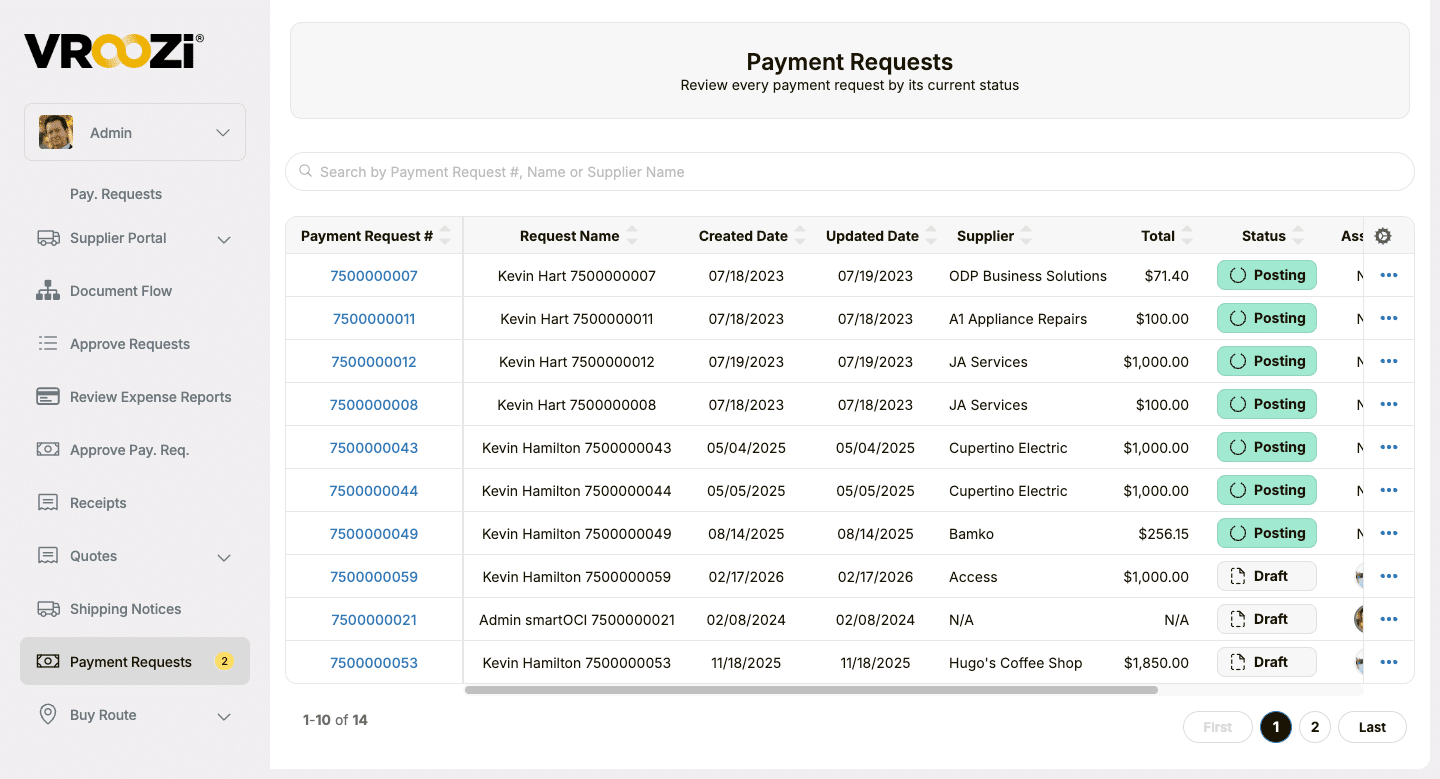
05 / Follow the request
See where a payment request stands.
Review supplier, amount, and workflow status in the payment requests view, so finance can identify what needs follow-up.
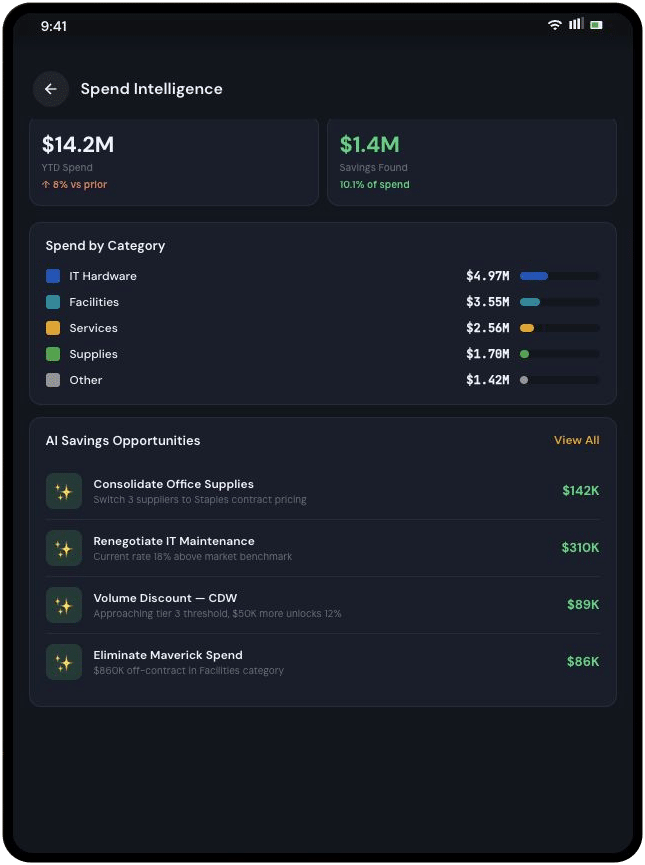
06 / See the patterns
Find the purchases worth discussing across sites.
Review supplier and category activity to see where repeat field purchases may call for a better contract, catalog, or policy path.
One platform, many jobs
The same transaction needs to make sense to every team.
A field purchase should be simple for the requester and still provide the context procurement, site leaders, and AP need later.
Field + maintenance
Find what the job needs.
Give technicians and site teams approved options for parts, safety supplies, and services while keeping the location and work context with the request.
Procurement
Guide buying across sites.
Manage supplier choices, catalogs, contracts, and approval rules while retaining site, project, and cost-center detail.
Finance + AP
Keep the record together.
Follow the purchase order, receipt, invoice, and exception trail with the context needed for review.
IT + ERP owners
Connect the systems you run.
Exchange purchasing and financial data with the existing ERP while carrying configured site, project, and accounting fields forward.
Built for your existing systems
Modern buying, connected to the ERP you run.
Vroozi is designed to connect guided buying, purchasing, and AP data with the ERP, financial, and asset management systems your teams use, including Deltek Costpoint, SAP, Oracle, NetSuite, Microsoft Dynamics, and IBM Maximo. Flexible integrations and APIs help carry purchasing context into your existing environment.
See how guided buying, approvals, purchasing, and AP data can connect to the systems your teams already use.
Vroozi buying Your ERP
- Approved supplier and catalog access
- Requisition and approval workflows
- Purchasing and AP data connected with financial context
Customer example / Oilfield equipment
Thomas Oilfield connected inventory needs to a buying path.
Thomas Oilfield Services connected Vroozi with NetSuite so low stock could trigger purchase requests from pre-approved suppliers and keep orders and inventory records in sync. Its team also built a customer marketplace for equipment purchases and rentals. This was Thomas’s tailored deployment.

A tailored purchasing network
The customer linked supplier selection, purchasing records, and inventory information in a configuration built for its oilfield equipment business.
Frequently asked questions
How Vroozi fits field purchasing.
Answers about supplier choice, site context, AP, and existing systems.
How can field sites buy through approved suppliers without waiting on email?
Vroozi can present the catalogs and suppliers your procurement team enables in one Marketplace. A requester can start there, add the needed work or location context, and submit the purchase into a configured approval path.
Can approvals differ by location, amount, or role?
Yes. Workflows can be configured around your organization’s rules. The exact routing and fields should be mapped during implementation rather than assumed from a generic page example.
Can we track purchases by site, project, or cost center?
Those fields can be captured and exchanged when they are part of the configured purchasing and ERP design. The demo should use your own reporting dimensions.
How are repair-service invoices handled?
Vroozi supports PO and non-PO invoice workflows, approval routing, and matching where a PO and receipt are available. Your service-receipt and exception rules should be defined with AP.
Does Vroozi replace our ERP or maintenance system?
No. Vroozi supports the buying and AP process around those systems. The data exchanged with an ERP or asset-management environment depends on your integration scope.
Does Thomas Oilfield's inventory automation come standard?
Thomas built a tailored connection between Vroozi and NetSuite that triggers requests from stock levels. We can discuss a comparable design for your systems, but that customer result should not be treated as a standard feature claim.
See it in your environment
Show us how your sites buy today.
Walk us through a field request, an approval, a receipt, and an invoice. We will show where Vroozi can fit the supplier rules and systems behind your operation.
Keep exploring
Go deeper on connected purchasing.
Explore the product, a relevant customer story, and the wider procure-to-pay process.
Product tour
Follow a connected purchase.
See the Vroozi screens behind supplier selection, approvals, orders, and AP.
Customer story
See Thomas Oilfield’s connected workflow.
Explore how an oilfield equipment supplier linked replenishment and purchasing.
Solution / Procure-to-pay
Connect buying through AP.
See the broader Vroozi workflow for requests, orders, invoices, and payments.