Industry solution / Grocery
Procure-to-Pay for Grocery
Give stores and distribution teams a clear way to buy the supplies and services that keep operations moving. Put approved suppliers in front of local buyers, carry store and cost-center context into approvals, and keep the order and invoice connected for AP.
- Store-friendly buying
- Location-aware approvals
- Connected purchasing and AP
Grocery buyingPROCURE-TO-PAY FLOW
Operational purchasing flow
One buying path. Every store.
- 01Find approved source
- 02Route for approval
- 03Track to invoice
- Store and cost center
- Captured on request
- Supplier choice
- Preferred options
- PO and invoice
- Connected record
Built around your reality
Frequent local buying moments
Different suppliers by region and site
High invoice volume and lean margins
The grocery buying reality
The store needs it today. Finance needs the record tomorrow.
A broken freezer door, missing sanitation supplies, or an urgent service call cannot wait for someone to decode procurement policy. Across stores and distribution centers, the same need may involve different approved suppliers, prices, and approvers. When a local purchase happens outside the process, AP inherits an invoice with little context and procurement loses sight of the agreement.
The approved source is not obvious at store level.
Put contracted and regional supplier choices where the request begins.
Urgency still needs a visible path.
Capture store, cost center, category, and amount so a local exception can be reviewed under the organization’s rules.
AP needs the order and receipt.
Keep the approved request, PO, receipt, and invoice together so exceptions are easier to investigate.
A better operating rhythm
Make repeatable purchasing easy across every location.
Vroozi brings common operating purchases into a usable workflow, then keeps the transaction visible through receipt and invoice review.
Find
Show approved suppliers, catalogs, and negotiated items where buyers start.
Request
Capture the store, department, cost center, and need before money is committed.
Approve
Route by configured policy, amount, role, or location.
Order & receive
Create a purchase order and record that goods or services arrived.
Invoice & learn
Match invoice details where configured, and analyze captured spend across sites and categories.
See Vroozi in action
A practical buying path for every location.
For store and distribution teams, these views connect supplier choice, request approvals, order status, and AP follow-up in one buying experience.
01 / FIND & CHOOSE
Start with approved sources for every location.
Give store and distribution teams a familiar place to find enabled suppliers and catalogs for maintenance, sanitation, fixtures, and operating services before creating a request.

02 / REVIEW & APPROVE
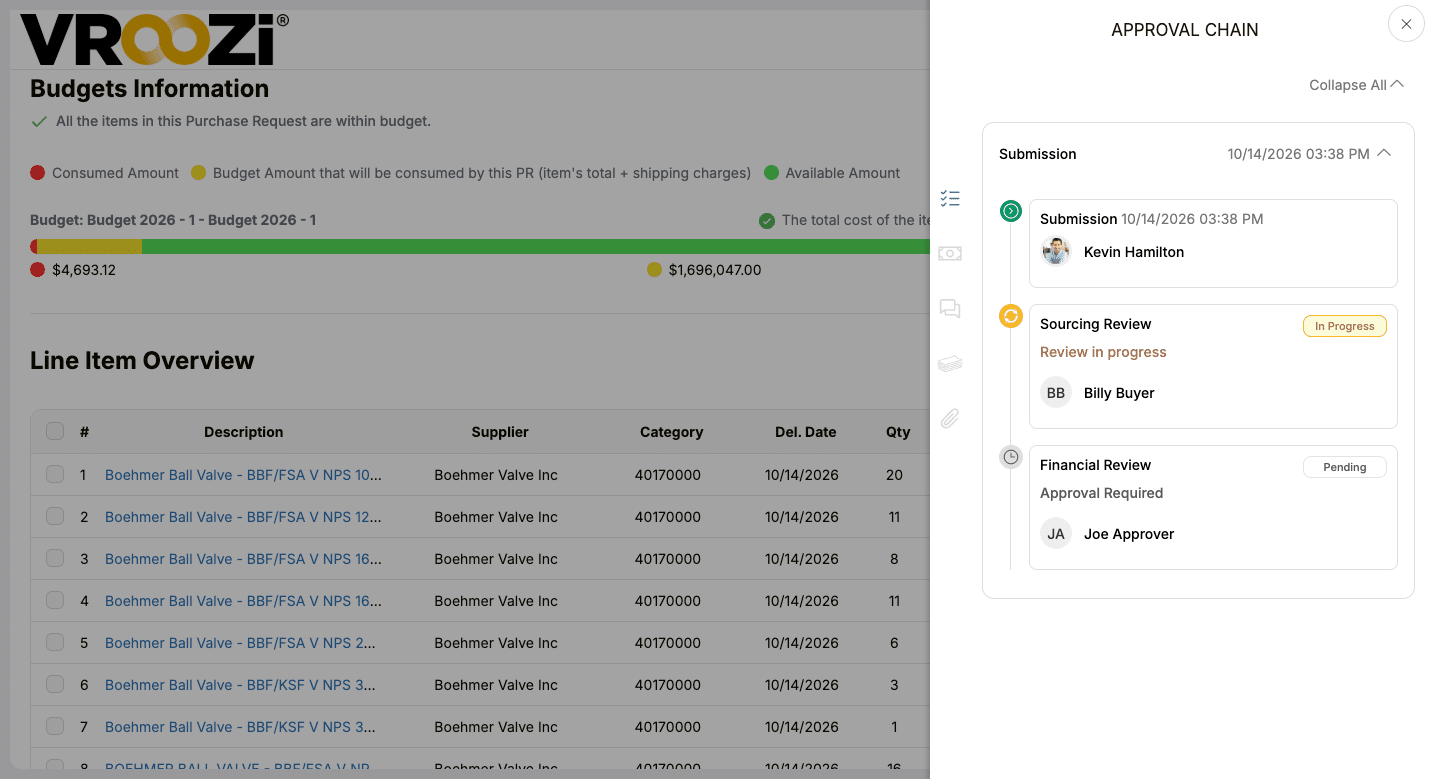
Keep local urgency inside the approval path.
Carry store, cost-center, amount, and purchase details into the configured review route so an urgent operating need has a visible decision path.
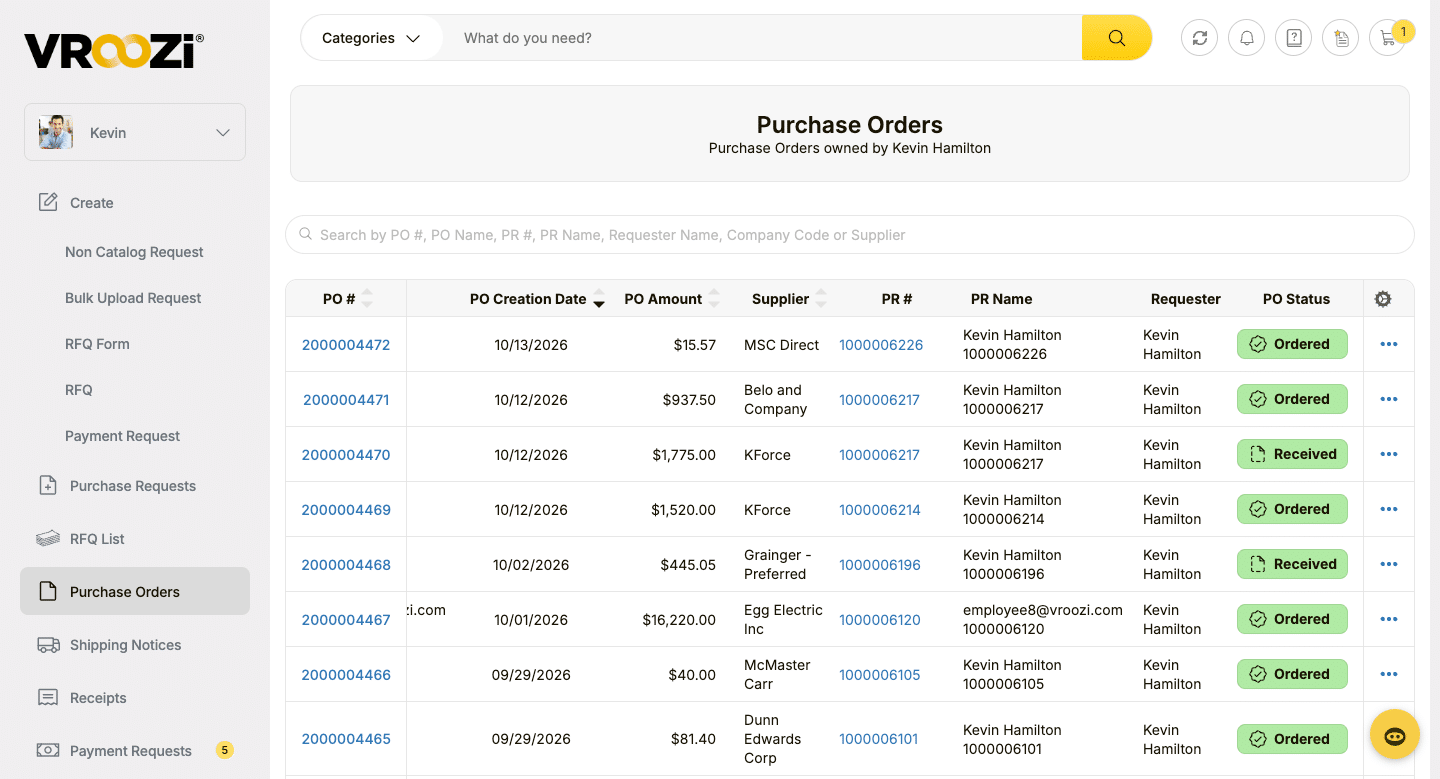
03 / ORDER & TRACK
Follow the order after approval.
Purchase order details and status sit in one view, giving users a shared record of what was ordered and where the order stands.
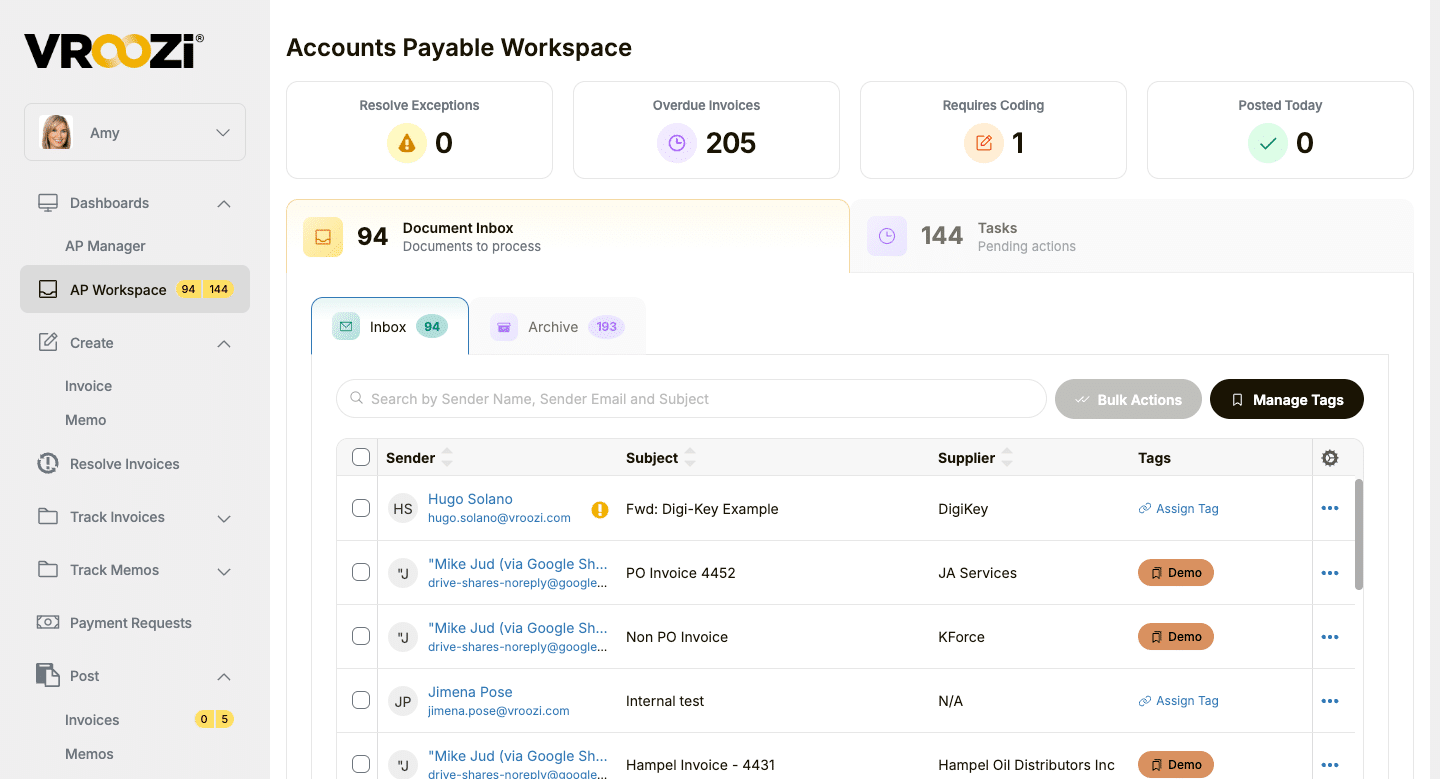
04 / WORK THE INVOICE
Give AP a clear next action.
See invoice inbox items, coding needs, overdue invoices, and pending tasks in one workspace. Custom tags help AP organize incoming invoice documents so teams can find and work the right items faster.
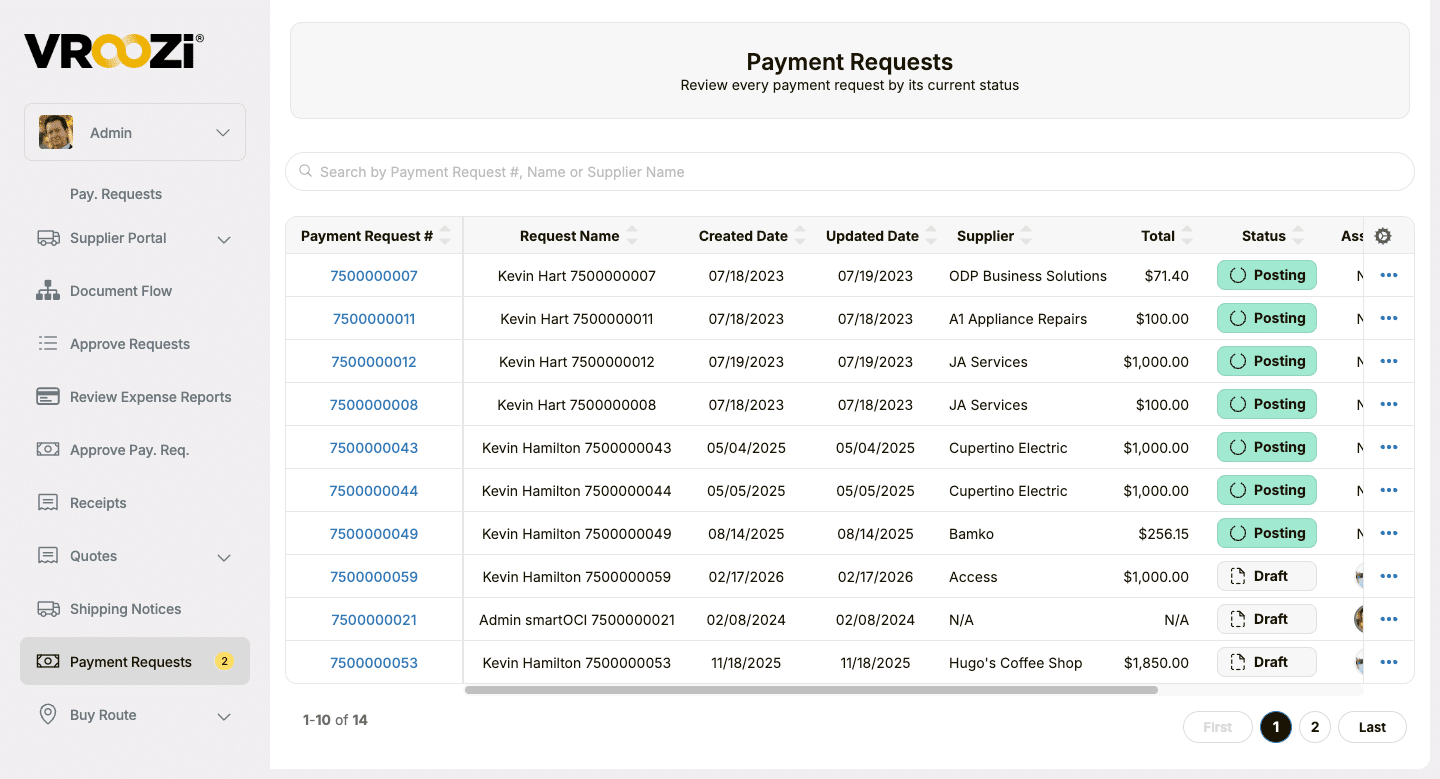
05 / FOLLOW THE REQUEST
See where a payment request stands.
Review requests by supplier, amount, and current workflow status, including Draft and Posting, so finance can identify what needs follow-up.
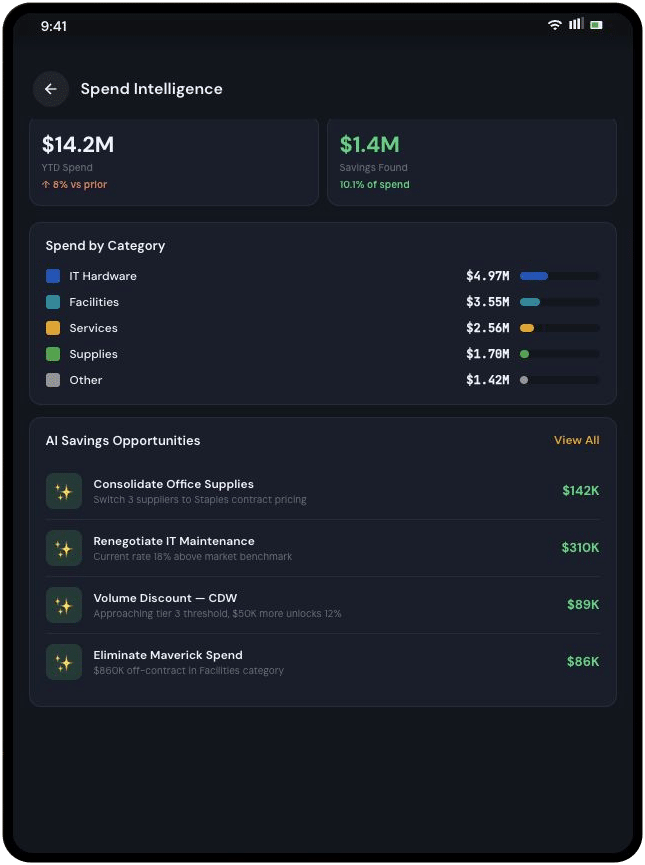
06 / SEE THE PATTERNS
Find patterns across stores and distribution centers.
Compare supplier and category activity across locations when those fields are captured, and identify repeat operating purchases worth discussing with procurement.
One process, different roles
Designed for the people who keep stores running.
A grocery buying process succeeds when it works for busy local teams and gives central leaders consistent information.
Store + field operations
Get the next item or service moving.
Find approved choices and submit requests without learning the back-office system.
Procurement
Put agreements to work.
Present preferred suppliers and pricing in the buying flow, with room for regional needs.
Finance + AP
See the purchase before the invoice.
Use POs, receipts, and invoice workflows to resolve exceptions with more context.
IT + ERP owners
Connect the existing environment.
Map location and accounting information into the financial systems your teams use.
Built for your existing systems
Fits the ERP and financial systems you already run.
Vroozi can connect purchasing and AP data with an existing ERP or financial system, including SAP, Oracle, NetSuite, Microsoft Dynamics, and others. The right integration design depends on your locations, data fields, approval model, and current system architecture.
See how guided buying, approvals, purchasing, and AP data can connect to the systems your teams already use.
Vroozi buying ↔ Your ERP
- Approved supplier and catalog access
- Requisition and approval workflows
- Purchasing and AP data connected with financial context
Where Vroozi fits
A practical layer for non-merchandise spend.
Store supplies, maintenance items, facilities services, equipment, and distribution-center operating needs generate countless purchasing decisions. Vroozi connects those decisions to preferred suppliers, approvals, POs, receipts, and invoices while your merchandising and inventory systems continue to manage the products you sell.
Frequently asked questions
How it works for grocery teams.
Straight answers about bringing distributed grocery buying into one procure-to-pay process.
What grocery purchases are in scope?
Vroozi supports indirect and operating purchases such as store supplies, maintenance items, facilities services, equipment, and distribution-center needs. Your team controls which suppliers, categories, and buying paths are available to each location.
Can approved suppliers and prices differ by store or region?
Supplier and catalog access can be configured for different groups and locations. Pricing depends on the supplier agreements and catalog setup in place for your organization.
How can a store handle an urgent need outside a catalog?
A requester can submit a non-catalog request with the details required by your policy. Configured approval rules determine who reviews it, giving unusual purchases a visible path.
Can approvals account for store, category, or amount?
Vroozi supports configurable purchasing and financial approval workflows. Routes can use the request fields your organization captures, subject to your setup.
How does AP know what a store received?
The organization can record receipt of goods or services against a PO. Invoice workflows can compare invoice details with that purchasing record where matching is configured.
Can finance compare indirect spend across locations?
Yes. Vroozi helps finance compare indirect spend across locations using captured purchasing and invoice data. Reporting can include store, region, category, and supplier, based on the fields captured through your workflows and integrations.
Does Vroozi replace our inventory, merchandising, POS, or ERP systems?
No. Vroozi supports purchasing and AP for operating spend alongside your existing inventory, merchandising, POS, and ERP systems. Integrations are scoped to your environment and requirements.
See what it could look like
Give every location a clearer way to buy.
Show us how stores and distribution teams purchase operating goods and services today. We’ll walk through approved suppliers, local approval rules, AP follow-up, and your ERP environment.
Keep exploring
Explore the next piece of your P2P plan.
Explore the grocery guide and the Vroozi capabilities that connect store purchasing to AP.
Industry guide
A closer look at grocery procurement and AP.
Explore buying, invoice, and payment considerations for grocers.
Solution / Marketplace
Bring preferred suppliers into one place.
See how hosted and punchout catalogs support everyday buying.
Solution / AP automation
Move invoices through with better context.
Connect invoice capture, matching, and exception review to purchase activity.
Solution / Procure-to-pay
Connect the whole buying cycle.
Follow a request through approvals, purchase orders, receipts, invoices, and payments.
Recognized on G2
A buying experience people want to use.
Vroozi’s G2 recognition reflects feedback across implementation, setup, results, and adoption. See what reviewers say about working with Vroozi.