Industry solution / Transportation & Logistics
Procure-to-pay for the network that keeps goods moving.
A depot needs a repair part, a terminal needs a service, and central AP needs the details behind the bill. Vroozi gives local teams a path to approved buying while keeping approvals, orders, receipts, and invoices connected across locations.
- Multi-location buying
- Configurable approvals
- ERP-connected AP
Operations buying deskRequest to record
A purchase across a distributed network
The local need keeps its location.
- 01FindApproved supplier
- 02RouteDepot + policy
- 03RecordOrder + invoice
- Location
- Captured at request
- Approval path
- Defined by role and threshold
- Invoice
- Reviewed with order context
Built around your reality
Locations need an easy buying path
Fleet and facility context matters
AP needs the order details
The network buying reality
A local purchase should not become a network-wide blind spot.
A terminal, warehouse, or fleet team may need tires, safety supplies, dock equipment, or maintenance services. When each location buys through a different inbox or supplier site, central procurement struggles to guide supplier choice and AP has to reconstruct the transaction.
The needed item is not in one place.
Give locations an easier route to the catalog items and service suppliers procurement has approved.
The approval needs the location story.
Capture depot, department, cost center, and any configured asset fields with the request so the right reviewer can act.
The invoice arrives after context has disappeared.
Keep the order and receipt available to AP, and give non-PO invoices an explicit review path.
The Vroozi approach
One buying path across depots, terminals, and offices.
The process can stay familiar for local requesters while procurement and finance receive the information they need to control and pay for purchases across the network.
Find & choose
Start with enabled supplier catalogs and approved sources.
Request
Add location, cost center, and vehicle or asset context where your organization has configured those fields.
Approve
Route the request under configured approval rules.
Order & receive
Issue a PO and record goods or service receipt where applicable.
Invoice & analyze
Review invoices, resolve exceptions, and examine supplier, location, or category activity where that data is captured.
See Vroozi in action
Let local teams buy. Let the whole network see the transaction.
For depot, terminal, and fleet teams, these views connect supplier choice, approval context, order status, AP work, and spend visibility in one buying experience.
01 / FIND & CHOOSE
Approved suppliers for every location.
Give depot, terminal, and facility teams a place to find enabled suppliers and catalogs for parts, supplies, and services before they create a request.

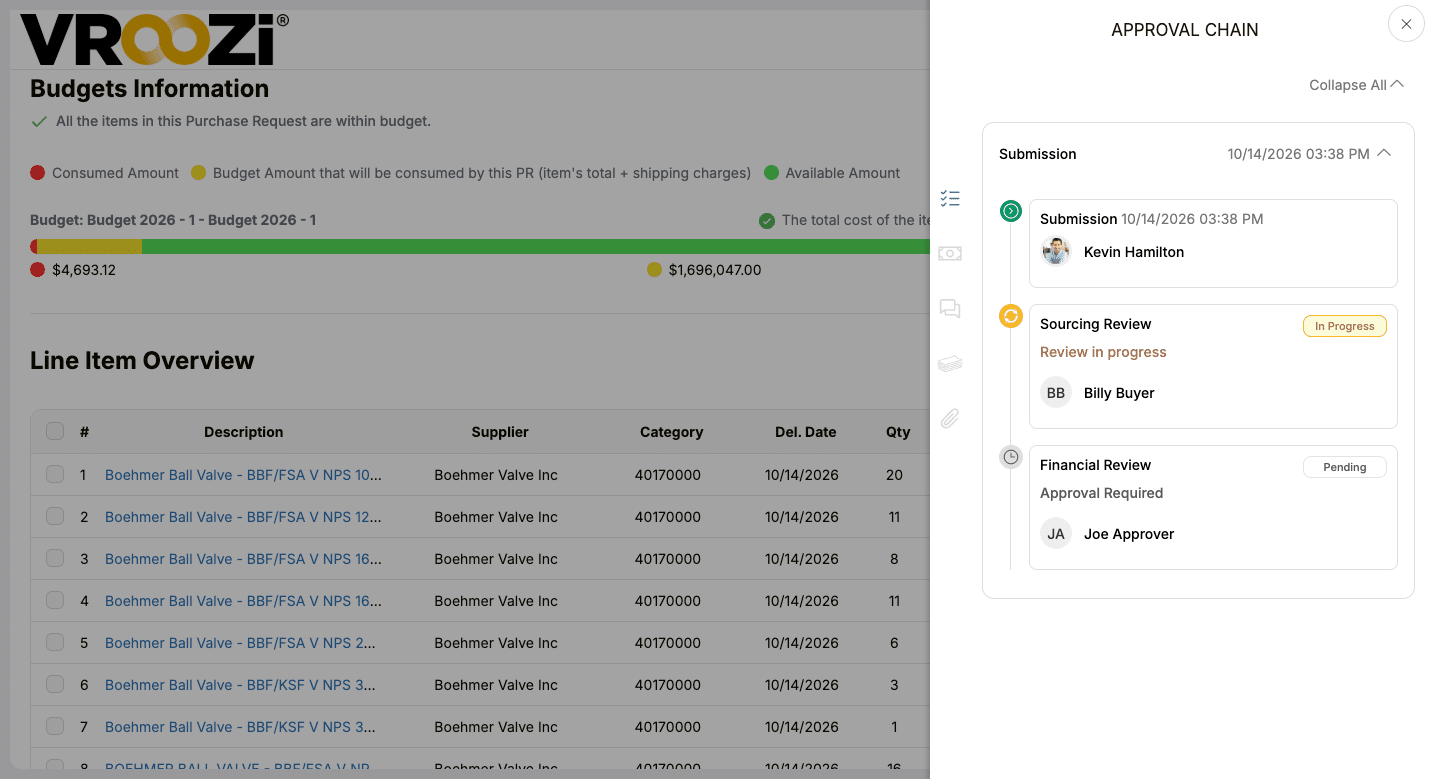
02 / REVIEW & APPROVE
Put location context in front of the approver.
Show the approval path with the depot, cost center, and other configured details reviewers need to assess the request.
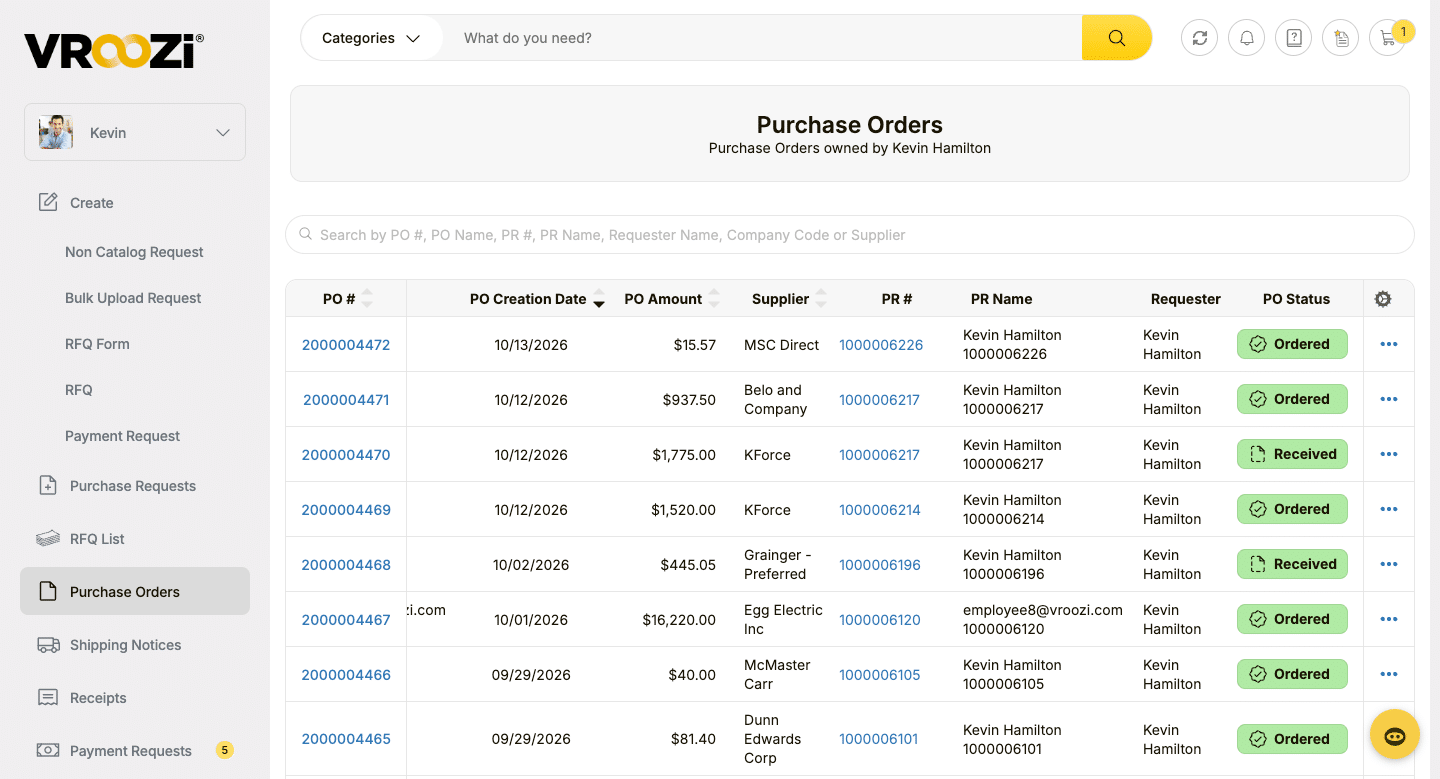
03 / ORDER & TRACK
Follow the order after approval.
Purchase order details and status sit in one view, giving users a shared record of what was ordered and where the order stands.
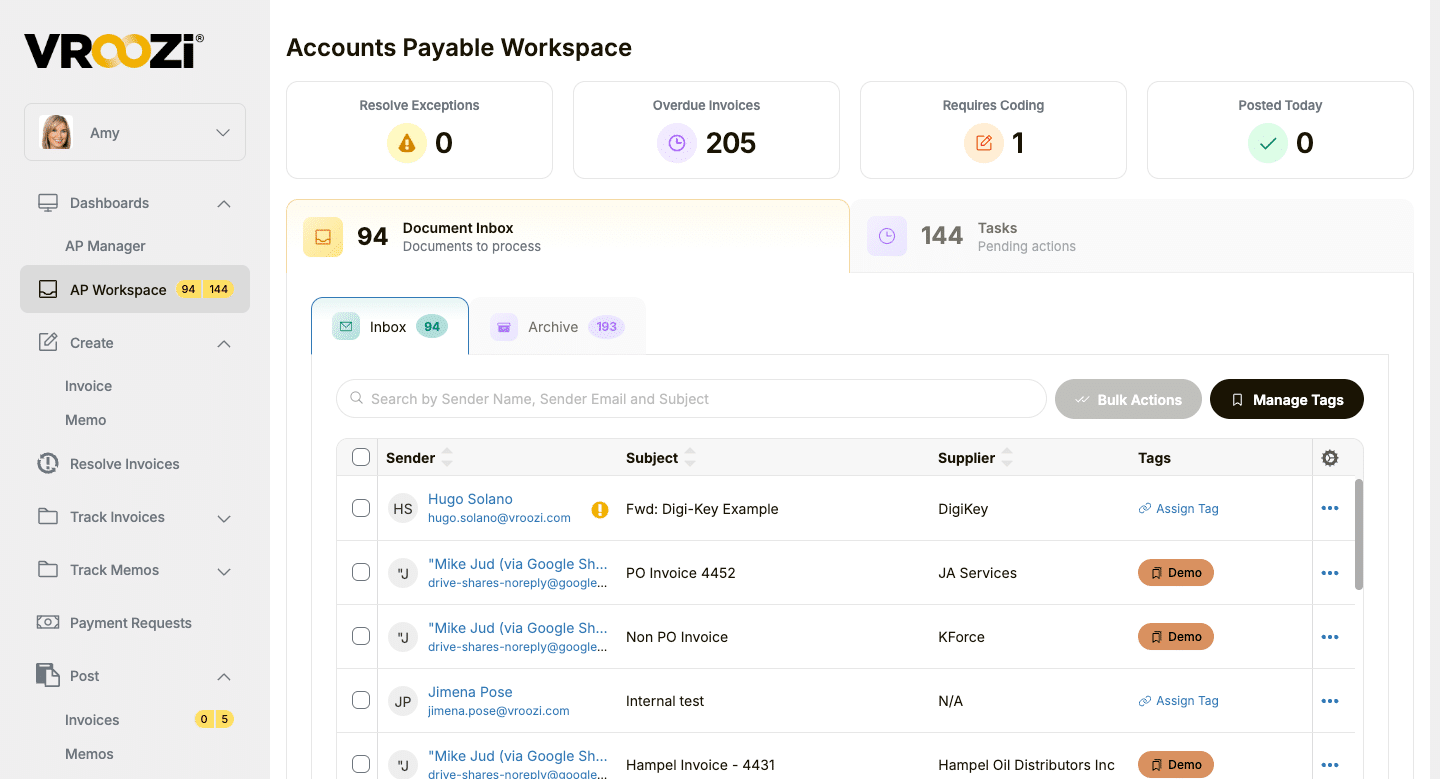
04 / WORK THE INVOICE
Give AP a clear next action.
See invoice inbox items, coding needs, overdue invoices, and pending tasks in one workspace. Custom tags help AP organize incoming invoice documents so teams can find and work the right items faster.
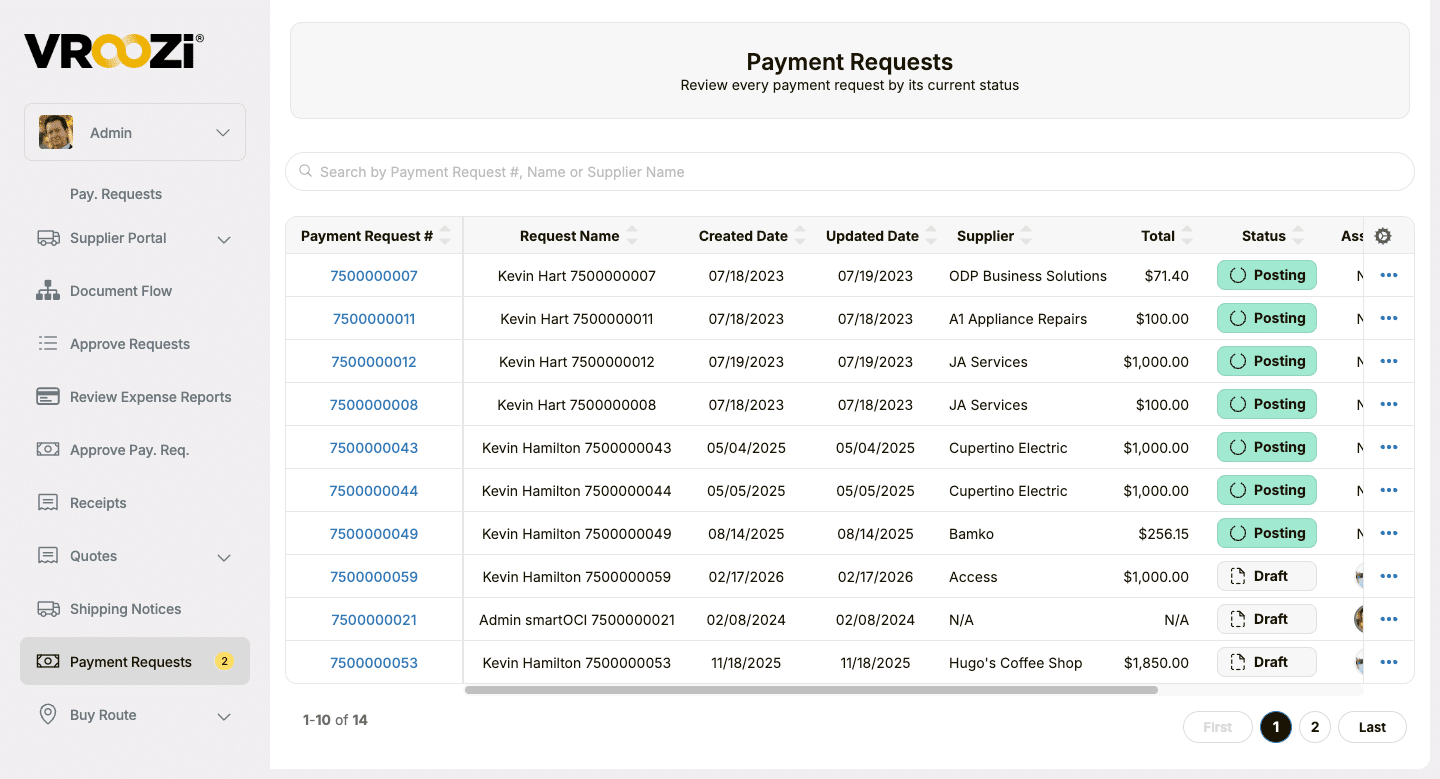
05 / FOLLOW THE REQUEST
See where a payment request stands.
Review requests by supplier, amount, and current workflow status, including Draft and Posting, so finance can identify what needs follow-up.
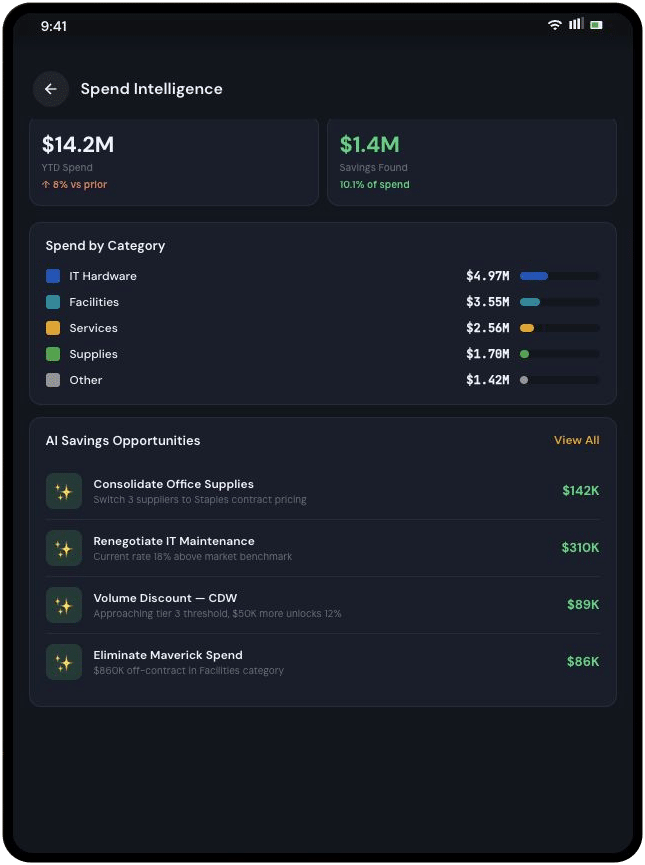
06 / SEE THE PATTERNS
Compare buying across the network.
Review supplier and category activity across locations, where those fields are captured, to find repeat purchases worth a better contract, catalog, or policy path.
One platform, many jobs
Built around the people who keep the network running.
Local teams need a practical way to buy. Procurement and AP need the transaction details that make network-wide review possible.
Depot + terminal teams
Start from approved options.
Find enabled parts, supplies, and services with the location context attached to the request.
Fleet + facilities
Keep work moving.
Request maintenance items and services with vehicle or asset detail where your process captures it.
Procurement
Guide buying across sites.
Manage supplier choices, catalogs, and approval rules across the network.
Finance + AP
Follow the record.
Review invoices with purchase context and compare supplier and category activity across locations.
Designed for your systems
Keep your financial system. Connect the buying work around it.
Vroozi can exchange purchasing and AP data with ERP and financial systems such as SAP, Oracle, NetSuite, and Microsoft Dynamics. The design can carry location, cost-center, or configured vehicle information where that data belongs in your process. Integration scope depends on your systems and data rules.
Connect local purchasing and central AP with the systems and data rules your network already uses.
Vroozi buying ↔ Your ERP
- Approved supplier and catalog access
- Requisition and approval workflows
- Purchasing and AP data connected with financial context
Customer story

Custom Goods nearly doubled invoice processing throughput.
Custom Goods Logistics connected purchasing and AP across 36 warehouses, giving warehouse teams access to more than 100 supplier catalogs and the AP team clearer spend visibility.
AP coordinators now process about 6–7 invoices per hour, up from 3–4. Approved invoice data flows into NetSuite, helping finance keep purchasing and invoice records connected.
Frequently asked questions
How Vroozi fits a distributed buying network.
Answers about local purchasing, fleet context, AP, and existing systems.
Can depots and terminals buy from the same approved suppliers?
Procurement can enable supplier catalogs and preferred sources in one Marketplace. Each location can start there while your configuration determines the available content, pricing, and approval route.
Can requests include a depot, cost center, or vehicle ID?
Vroozi can use organizational and custom fields for depot, cost-center, or vehicle details, helping reviewers connect the purchase to the location or asset behind it. Your team defines which fields belong in its purchasing and AP workflows.
What happens when an invoice has no PO?
Vroozi supports PO and non-PO invoice workflows. AP can route a non-PO invoice for review instead of forcing it into a PO match that does not exist.
Can AP compare an invoice with the order and receipt?
Vroozi supports two- and three-way matching when those records are available. Exceptions can be reviewed with the relevant transaction details.
Does Vroozi replace our TMS, WMS, or ERP?
No. This page describes purchasing and AP, not dispatch, routing, or warehouse execution. Vroozi can exchange relevant data with the financial systems in your environment; the integration design depends on those systems.
Can procurement compare spend across locations?
Vroozi's spend views can help teams examine supplier and category activity. The location and asset dimensions available for analysis depend on the fields captured and systems connected.
See it in your environment
Show us how a local purchase moves through your network.
Start with one depot request and one invoice. We will walk through supplier access, approval rules, AP handling, and the data your central team needs from each location.
Keep exploring
Go deeper on connected purchasing.
Explore a relevant customer story, the industry guide, and the wider purchasing and AP process.
Customer story
See how Custom Goods connected purchasing and AP.
Explore warehouse purchasing, faster invoice processing, and a connected NetSuite workflow.
Industry guide
Connect purchasing across a distributed network.
Explore the Transportation & Logistics guide to purchasing, invoices, and payments.
Solution / Procure-to-pay
Connect the complete purchasing cycle.
See how Vroozi brings buying, approvals, invoicing, and payments into one P2P process.
Solution / Accounts payable
Get more context into every invoice.
Learn how invoice capture, matching, and AP workflows fit into the process.
Recognized on G2
A buying experience people want to use.
Vroozi’s G2 recognition reflects feedback across implementation, setup, results, and adoption. See what reviewers say about working with Vroozi.