Industry solution / Government Contractors
Procure-to-Pay for Government Contractors
Keep project buying moving with the records finance needs. Give project and field teams a clear path to approved supplies, equipment, and services, while purchasing and AP keep approvals, coding, supporting documents, and ERP context together.
- Project details on requests
- Configured purchasing controls
- Connected buying and AP
GovCon project buyingPROCURE-TO-PAY FLOW
From project need to financial record
Keep the project with the purchase.
- 01FindApproved source
- 02ReviewProject + policy
- 03ConnectOrder + invoice
- Project and cost center
- Captured on request
- Approval decision
- Recorded in workflow
- Supporting documents
- Available for review
Built around your reality
Project teams buying across jobs and sites
Approvals, coding, and documents to capture
Project and cost center visibility for finance
The project buying challenge
The request is urgent. The project record still matters.
A project team needs equipment, a field office needs supplies, and a service purchase needs approval. Across government-contract work, those requests can reach purchasing and finance with different levels of detail. When project references, coding, or supporting documents arrive later, teams spend more time rebuilding the record before they can move the transaction forward.
Approved sources need to be easy to find.
Give project and field teams a shared starting point for the suppliers and buying options procurement has enabled.
The project context needs to arrive early.
Capture the configured project, cost center, and reference fields before a purchase reaches its approvers.
AP needs the supporting record.
Keep the request, approval, purchase order, receipt, and invoice connected so finance can review the purchase with context.
A connected purchasing process
Carry project context from the first request.
Help project teams follow one buying path, then carry the captured details through approvals, purchasing, and AP review.
Find
Start with enabled suppliers, catalogs, and negotiated buying options.
Request
Capture the need, project, cost center, and required supporting details.
Approve
Route the request through configured purchasing and financial reviews.
Order & receive
Connect the approved request to a purchase order and receipt record.
Invoice & review
Review invoices with purchasing context and analyze the project fields captured.
See Vroozi in action
A usable buying path for project teams.
Connect supplier selection, approval status, purchase records, and AP tasks so project teams and finance can work from a shared transaction history.
01 / FIND & CHOOSE
Start project purchases with approved sources.
Give field and office teams one place to find enabled suppliers and catalog options for project supplies, equipment, and operating services before creating a request.

02 / REVIEW & APPROVE
Review the need with its project context.
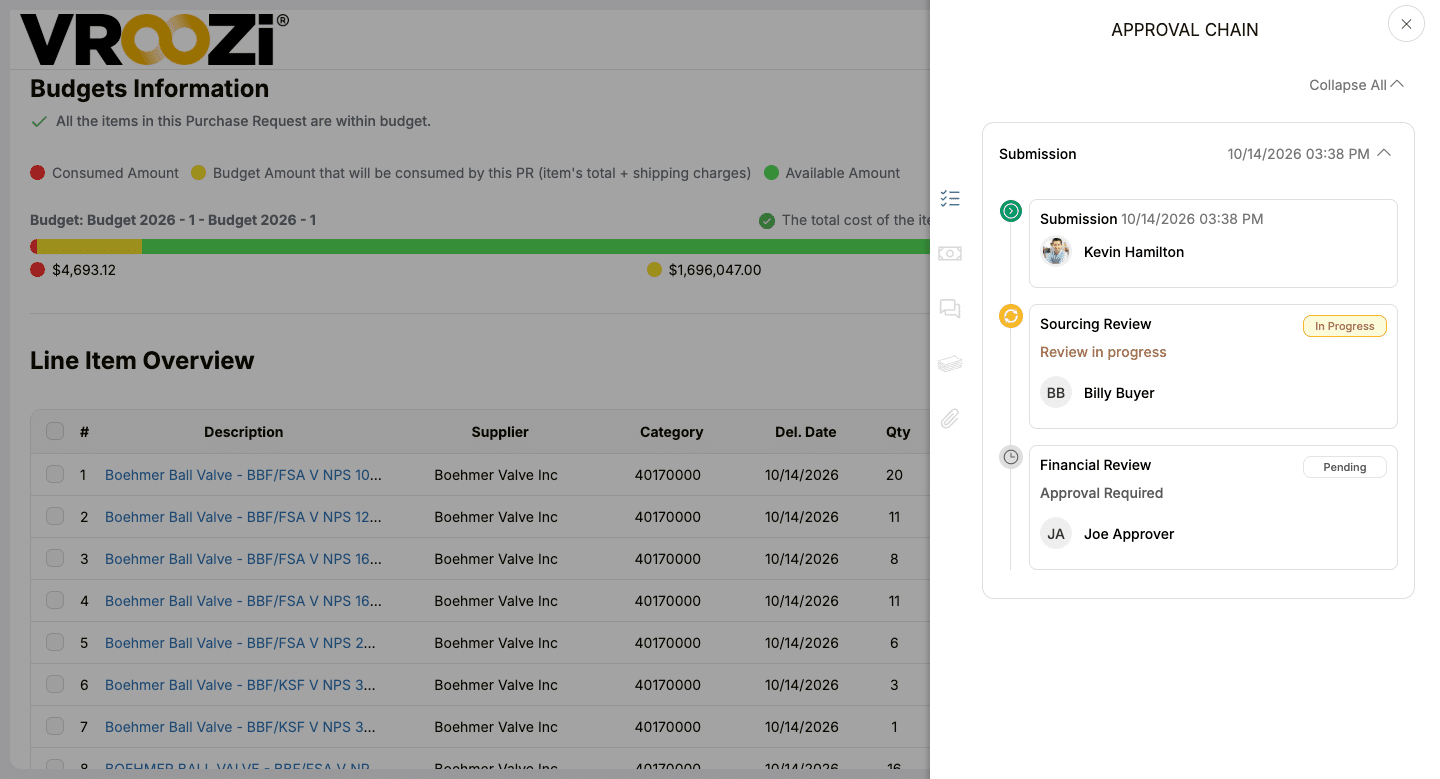
Bring request details, budget information, and approval steps into view so reviewers can assess the purchase under the workflow your organization configures.
03 / ORDER & TRACK
Keep the approved order visible.
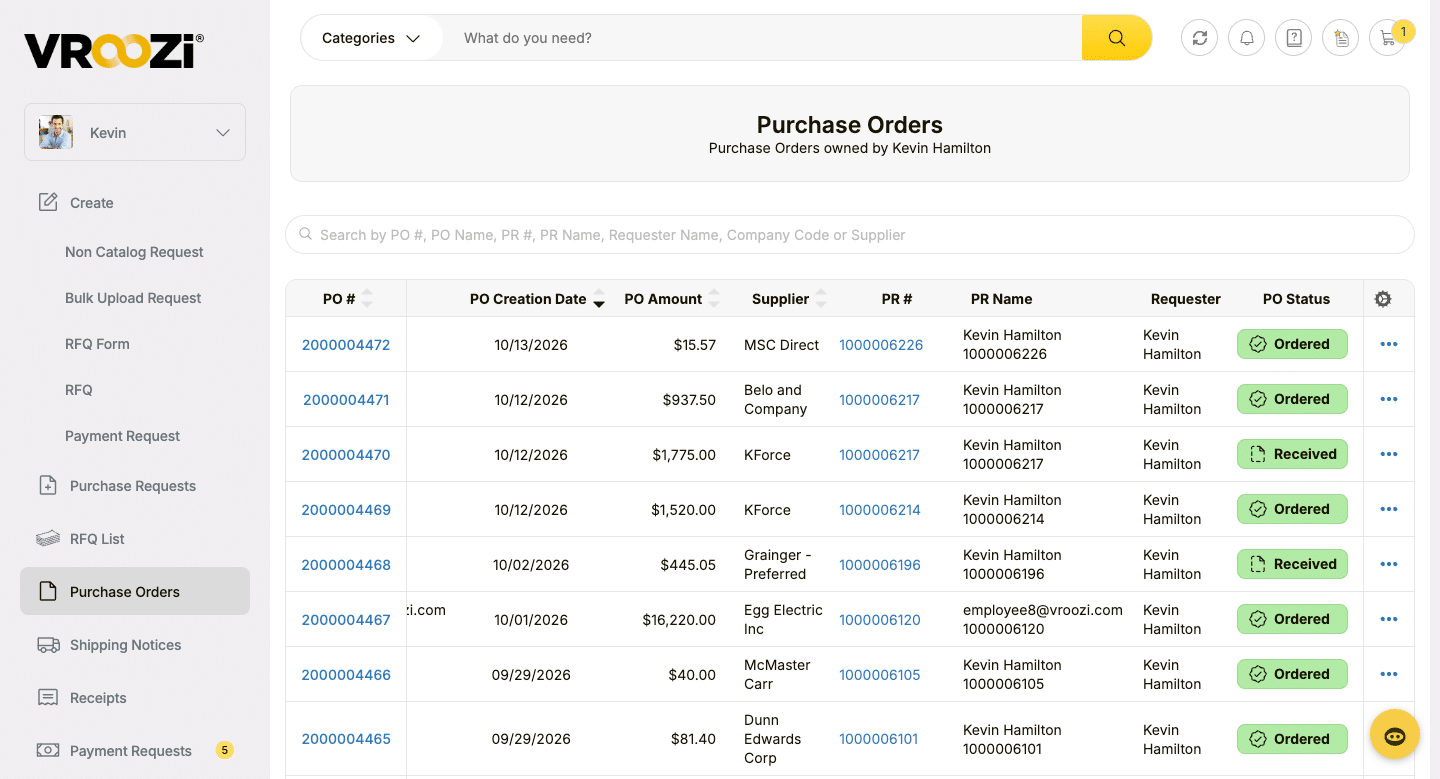
Use a shared purchase-order record to follow suppliers and order status after approval, keeping project teams and purchasing aligned on what was ordered.
04 / WORK THE INVOICE
Give AP the record behind the expense.
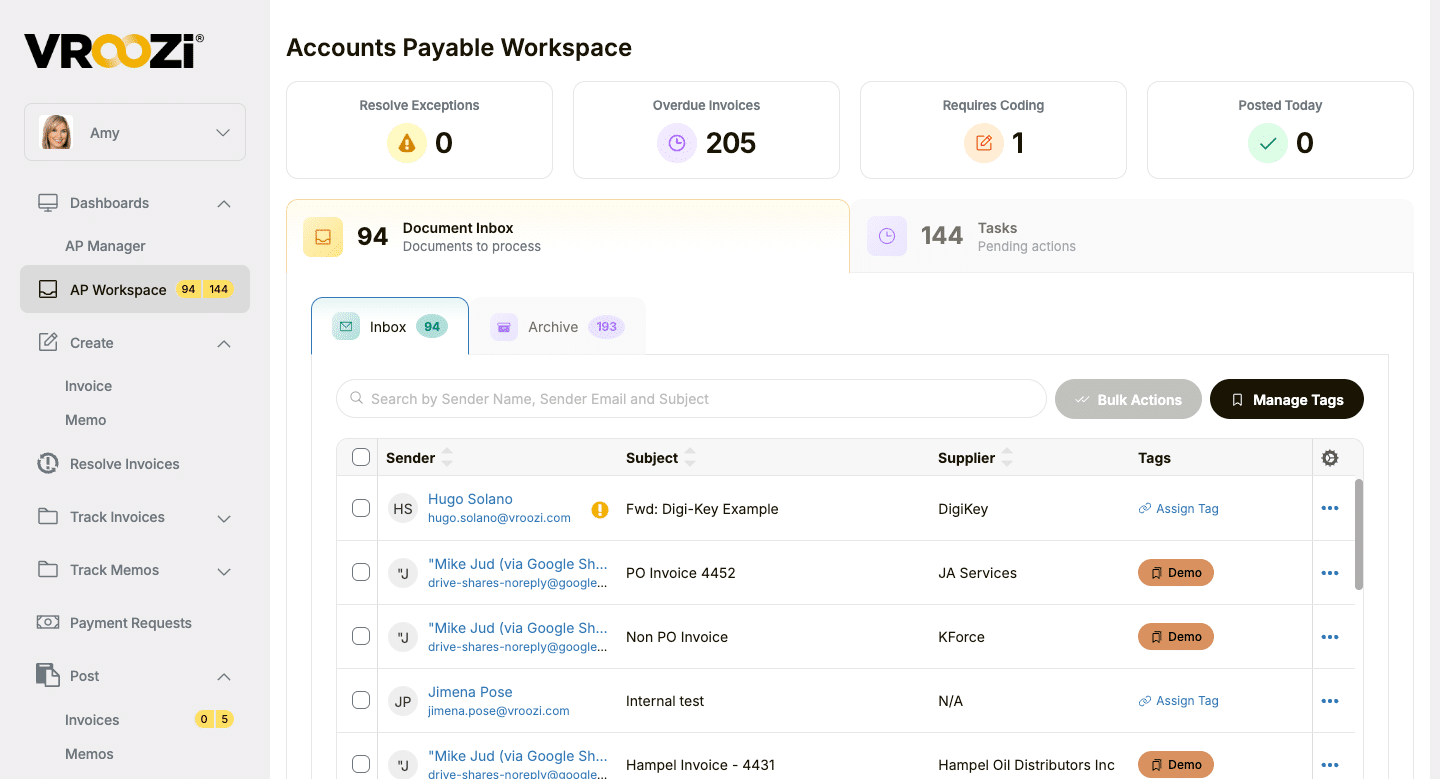
Review invoice inbox items, coding needs, overdue invoices, and pending tasks in one workspace. Use the connected purchasing details to investigate exceptions and move invoice work forward.
05 / FOLLOW THE REQUEST
See which payment requests need follow-up.
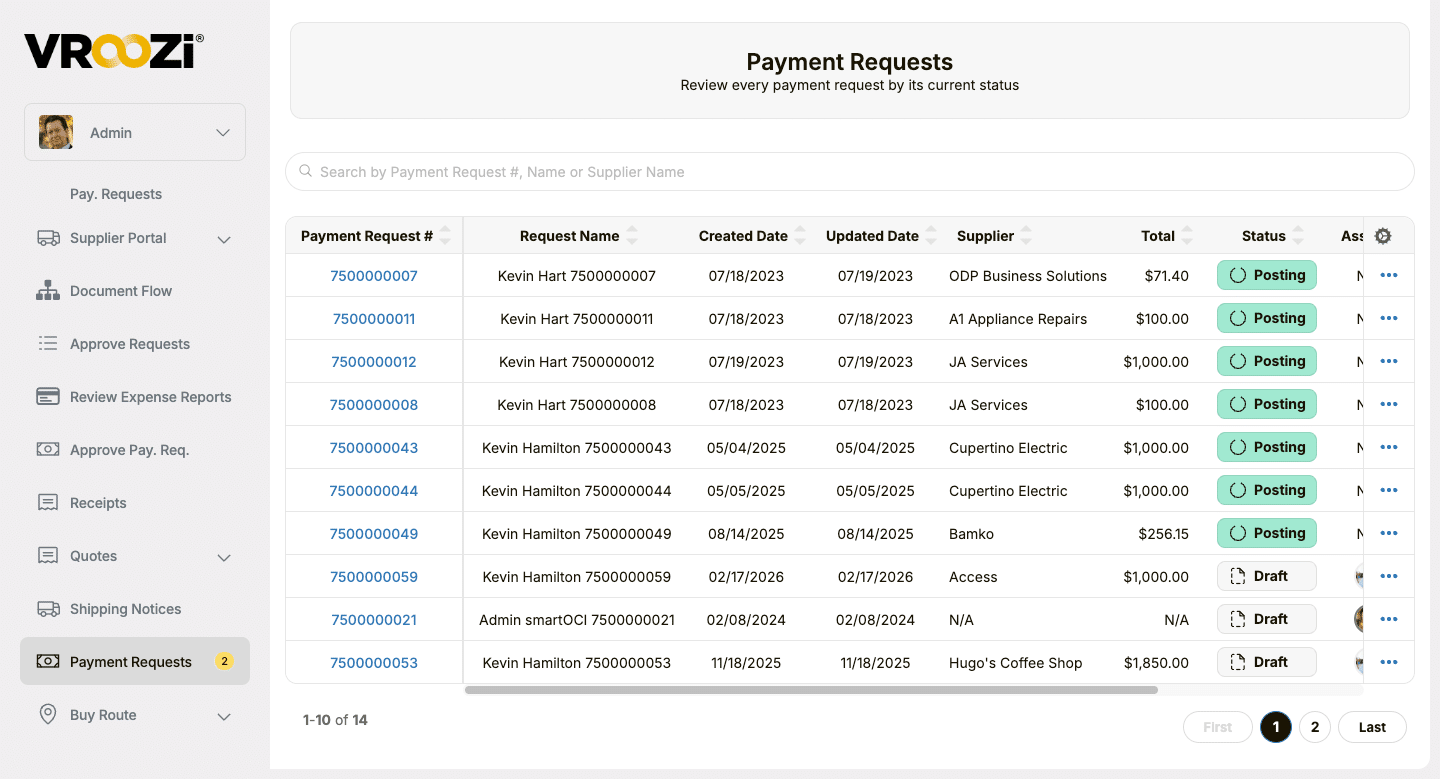
Review supplier, amount, and workflow status, including Draft and Posting, so finance can identify requests that need attention.
06 / SEE THE PATTERNS
Look across project and supplier spend.
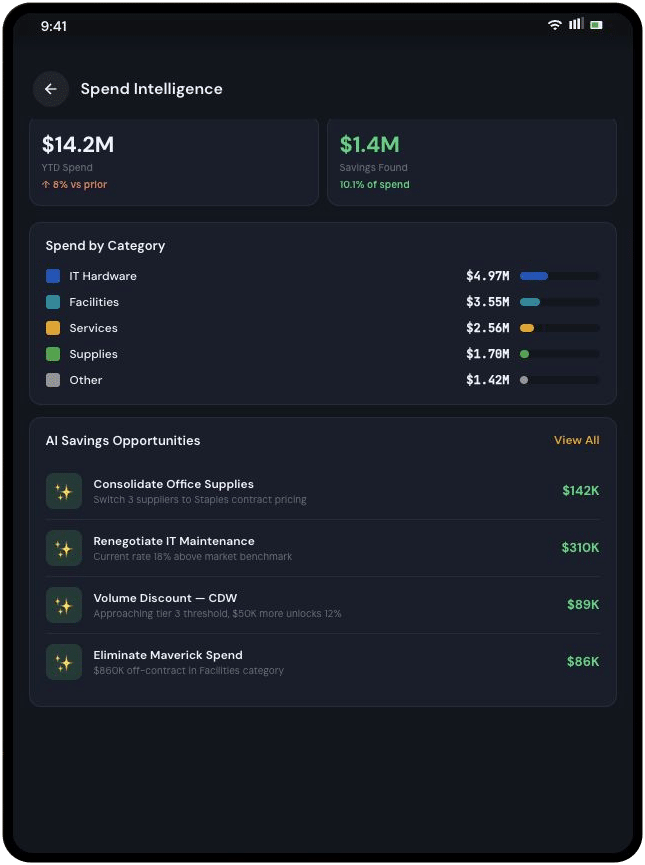
Analyze captured purchasing and invoice data to understand supplier and category activity. Project and cost center views depend on the fields and integrations configured for your organization.
One process, connected responsibilities
Give project teams and finance a shared record.
Make it easier to request what a project needs while giving procurement, AP, and system owners the context they use to manage the purchase.
Project + field teams
Keep work moving.
Find enabled buying options and submit requests with project details and supporting documents in one process.
Procurement
Guide the purchase.
Manage supplier and catalog choices, and configure the approval paths that support your purchasing policies.
Finance + AP
Review with context.
Connect purchase records, coding, invoices, and captured project spend so fewer details have to be reconstructed later.
IT + ERP owners
Connect the financial record.
Scope the fields and transaction data exchanged with Deltek Costpoint or the ERP your organization already uses.
Built for your existing systems
Connect project buying to your financial environment.
Vroozi connects purchasing and AP with existing ERP and financial systems, including Deltek Costpoint, SAP, Oracle, NetSuite, Microsoft Dynamics, and IBM Maximo. Define the purchasing and project data your teams need to exchange as part of the integration scope.
For Costpoint and other project accounting environments, confirm the project references, cost center fields, and transaction records that should move between systems.
Vroozi purchasing + AP ↔ Your financial systems
- Approved supplier and catalog access
- Configured request and approval workflows
- Purchasing and AP data with project context
Where Vroozi fits
Support the purchasing process around your projects.
Vroozi brings approved supplier access, purchasing workflows, invoices, and payments into a connected process for government contractors. Architecture, construction, engineering, and other project teams can use that process to keep buying and supporting records together.
Your team defines purchasing policies, project coding, and contract-specific review requirements. Workflow configuration and ERP integration determine the fields and records carried through the process.
Frequently asked questions
How Vroozi fits government contractor buying.
Direct answers about project context, suppliers, approvals, invoices, and the financial systems you already use.
What is procure-to-pay for government contractors?
Procure-to-pay connects supplier selection, requests, approvals, purchase orders, receipts, invoices, and payment. For government contractors, Vroozi helps project teams follow a buying process while preserving the project, coding, and supporting information finance needs.
Can purchase requests include project or contract references?
Yes. Vroozi can capture project, cost center, and other reference fields configured for your organization. Confirm which project or contract references are required, how they are validated, and which fields need to pass to your ERP during implementation.
How can project teams buy from approved suppliers?
Vroozi gives requesters a guided buying experience with the suppliers, hosted catalogs, and punch-out options procurement has enabled. Available content and pricing depend on your supplier agreements and configuration.
Can approval paths follow project budgets and purchasing policies?
Yes. Approval workflows can be configured around roles, budgets, policy, and purchase details. The fields and approval rules in your setup determine how a project purchase reaches the appropriate reviewers.
Does Vroozi work with Deltek Costpoint or another ERP?
Yes. Vroozi works with Deltek Costpoint and other ERP and financial systems. The integration scope determines which project data, purchasing records, and AP information move between Vroozi and your existing environment.
How does Vroozi help AP review invoices for project purchases?
Vroozi supports invoice capture and review workflows using the related purchasing record. Where matching is configured, AP can compare an invoice with purchase-order and receipt information, then investigate exceptions with the available project context.
Can finance review spend by project and cost center?
Yes, when those fields are captured in the purchasing and invoice workflow. Vroozi provides spend visibility from transaction data; project, cost center, supplier, and category reporting depends on the data available through your configuration and integrations.
Bring a project buying scenario
Put project buying and AP on the same path.
Show us a typical request, its approval route, and the project information finance needs. See how Vroozi could connect your suppliers, purchasing process, invoices, and ERP.
Keep exploring
Plan the next step for GovCon purchasing.
Explore the government contractor overview, project-system connections, and the purchasing and AP workflows behind the process.
GovCon overview
See the project buying and AP picture.
Explore approved suppliers, purchasing policies, supporting records, and project-spend visibility.
ERP connection / Deltek Costpoint
Connect buying to project accounting.
Explore how Vroozi works alongside Deltek Costpoint for guided buying, purchasing, and AP.
Solution / Procure-to-pay
Connect the purchasing cycle.
Follow the workflow from a request and approval to orders, invoices, and payment.
BLOG / DELTEK COSTPOINT
5 ways to improve Costpoint procurement.
Explore how Vroozi brings approved catalogs, purchasing workflows, and project spend visibility to Deltek Costpoint.
Recognized on G2
A buying experience people want to use.
Vroozi’s G2 recognition reflects feedback across implementation, setup, results, and adoption. See what reviewers say about working with Vroozi.