Industry solution / Aerospace & Defense
Procure-to-Pay for Aerospace & Defense
Move faster. Buy smarter. Stay in control. Give engineers and program teams an easier path to approved suppliers, while procurement and finance keep policy, project, and spend context connected to your existing ERP.
- Guided buying
- Policy-based approvals
- Works with your ERP
Program control deskIndirect buying flow
A connected path from need to record
A request moves with its context.
- 01FindApproved supplier
- 02RoutePolicy + approval
- 03RecordProject + cost center
- Contract pricing
- Visible at selection
- Approval path
- Defined by policy
- Invoice + receipt
- Ready to match
Built around your reality
Many requesters across programs and locations
Supplier, contract, and approval rules to follow
Project-level answers finance can use
Where control breaks down
The small purchases that become a big visibility problem.
Indirect and operational buying spans teams, suppliers, and programs. When the request starts in an inbox or an unconnected vendor site, it is harder to guide the purchase, capture the right context, and understand what happened later.
Employees need a clear buying path.
Make preferred suppliers and negotiated options easier to find, so a routine need does not become a sourcing detour.
Approvals need to fit the purchase.
Route requests according to configured roles, budgets, and policies, with a record teams can follow.
Finance needs the full picture.
Keep project and cost-center data with purchasing activity and connect it to invoice and payment workflows.
The Vroozi approach
A governed path from request to payment.
Bring everyday buying into one process people can use, with controls and data that travel through the transaction.
Find & choose
Search approved suppliers, hosted catalogs, and punch-out options.
Request
Capture the need with program, project, and cost-center context.
Approve
Apply configured role, budget, and policy routes.
Order & receive
Connect purchasing activity to purchase orders and receipt records.
Invoice & analyze
Use invoice capture, matching, and spend visibility to close the loop.
See Vroozi in action
A clearer path from supplier choice to purchase record.
For engineers and program teams, these views connect available suppliers, approval context, order status, and spend visibility in one buying experience.
01 / Find & choose
Start program buying with approved suppliers.
Give engineers and program teams one place to find the suppliers and catalog items procurement has enabled for parts, tools, consumables, and services.

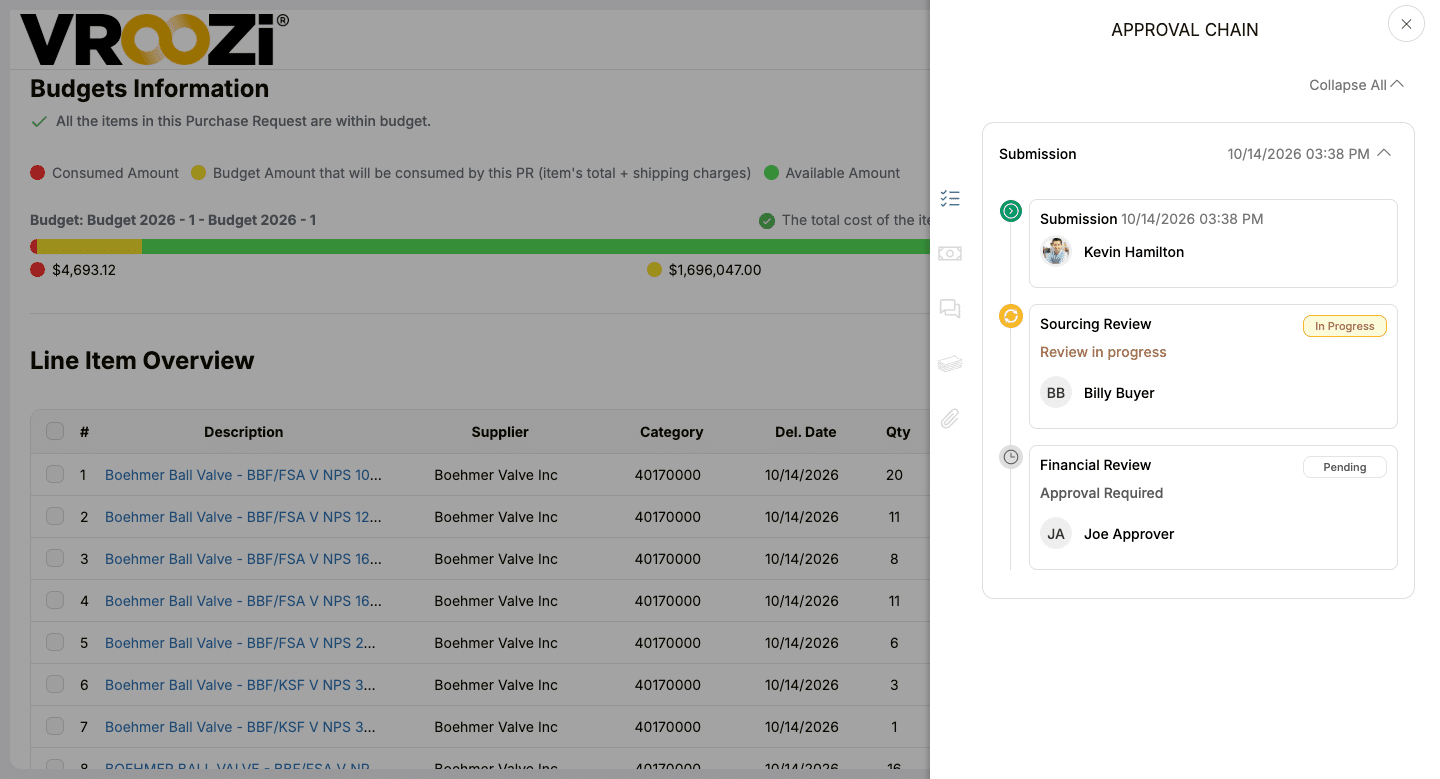
02 / Review & approve
Make the approval path visible.
A request view brings budget information and approval steps together so reviewers can see where a purchase stands.
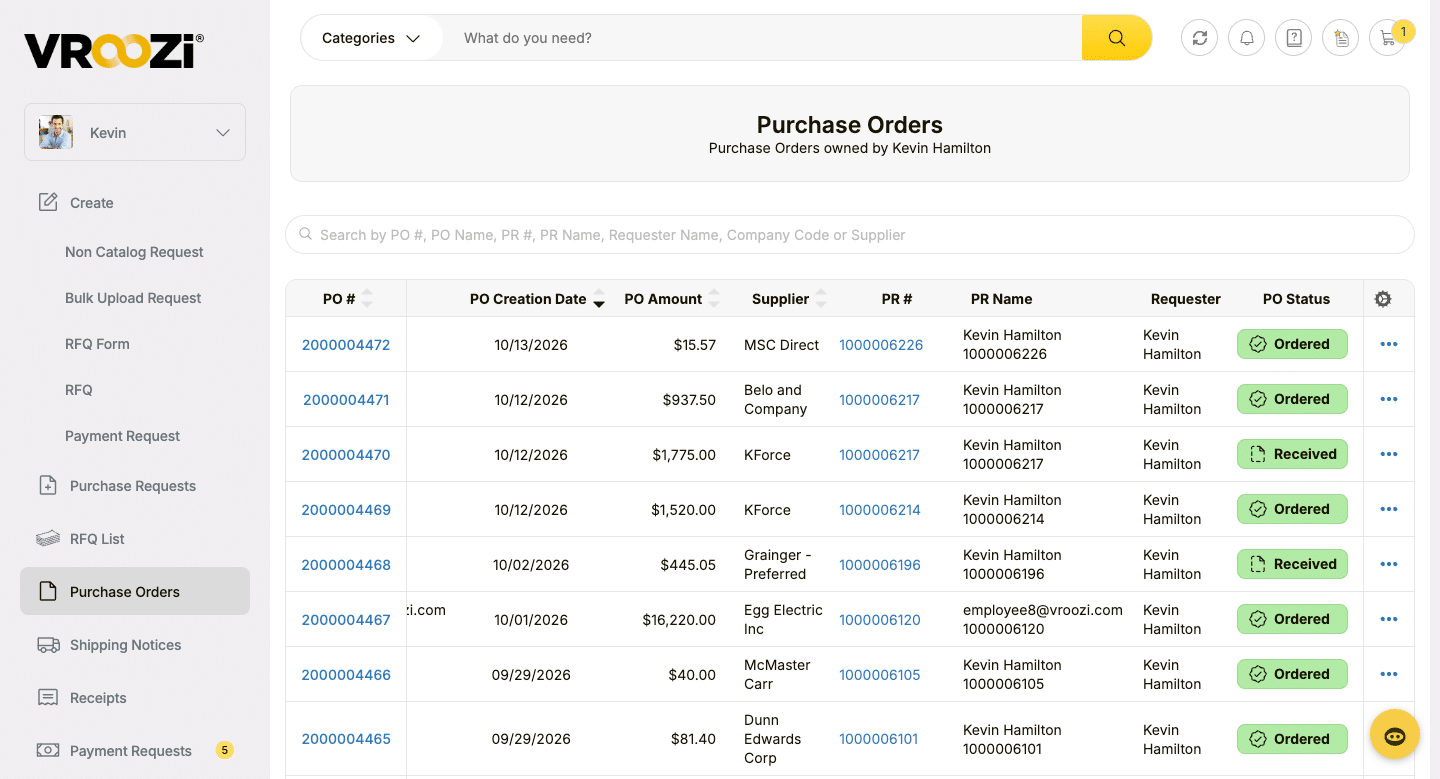
03 / Order & track
Follow the order after approval.
Purchase order details and status sit in one view, giving users a shared record of what was ordered and where the order stands.
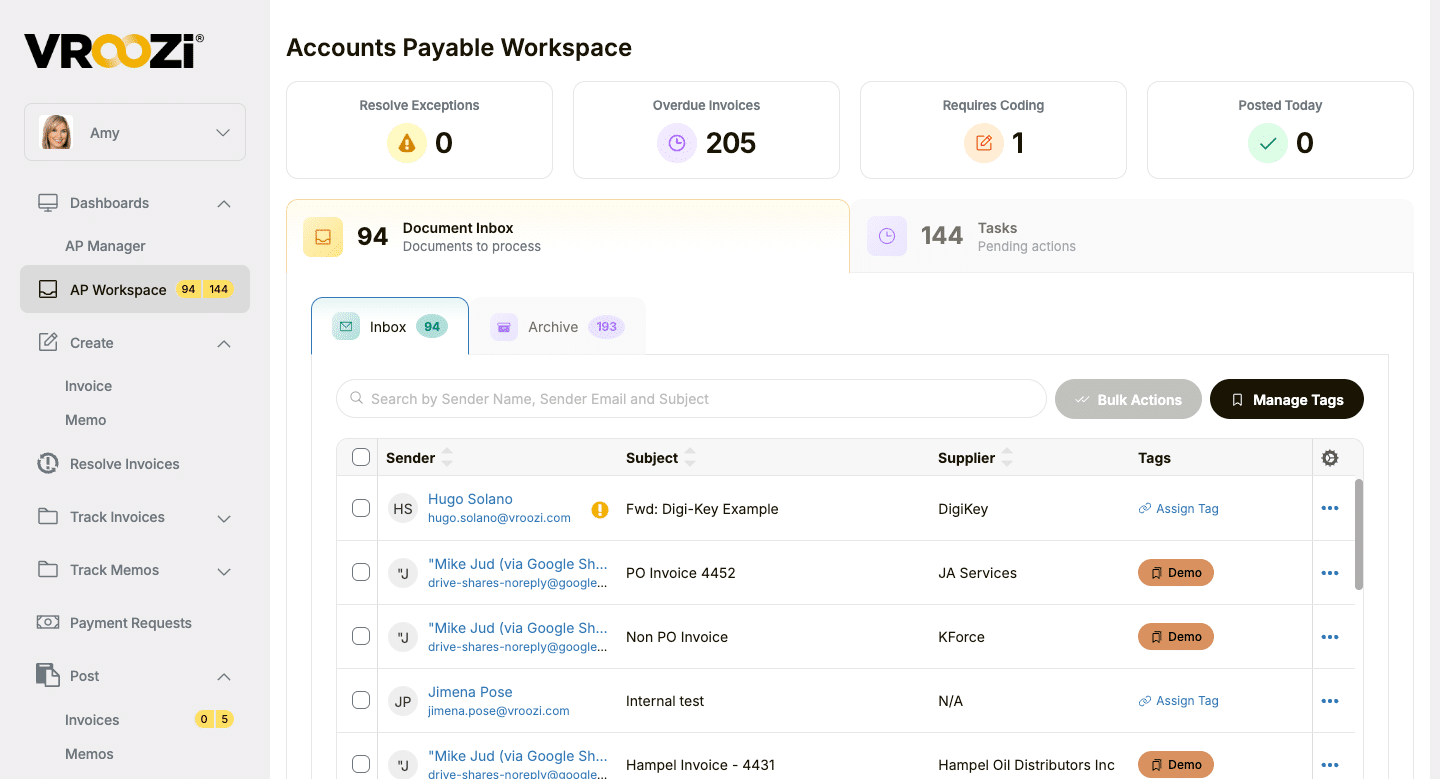
04 / Work the invoice
Give AP a clear next action.
See invoice inbox items, coding needs, overdue invoices, and pending tasks in one workspace. Custom tags help AP organize incoming invoice documents so teams can find and work the right items faster.
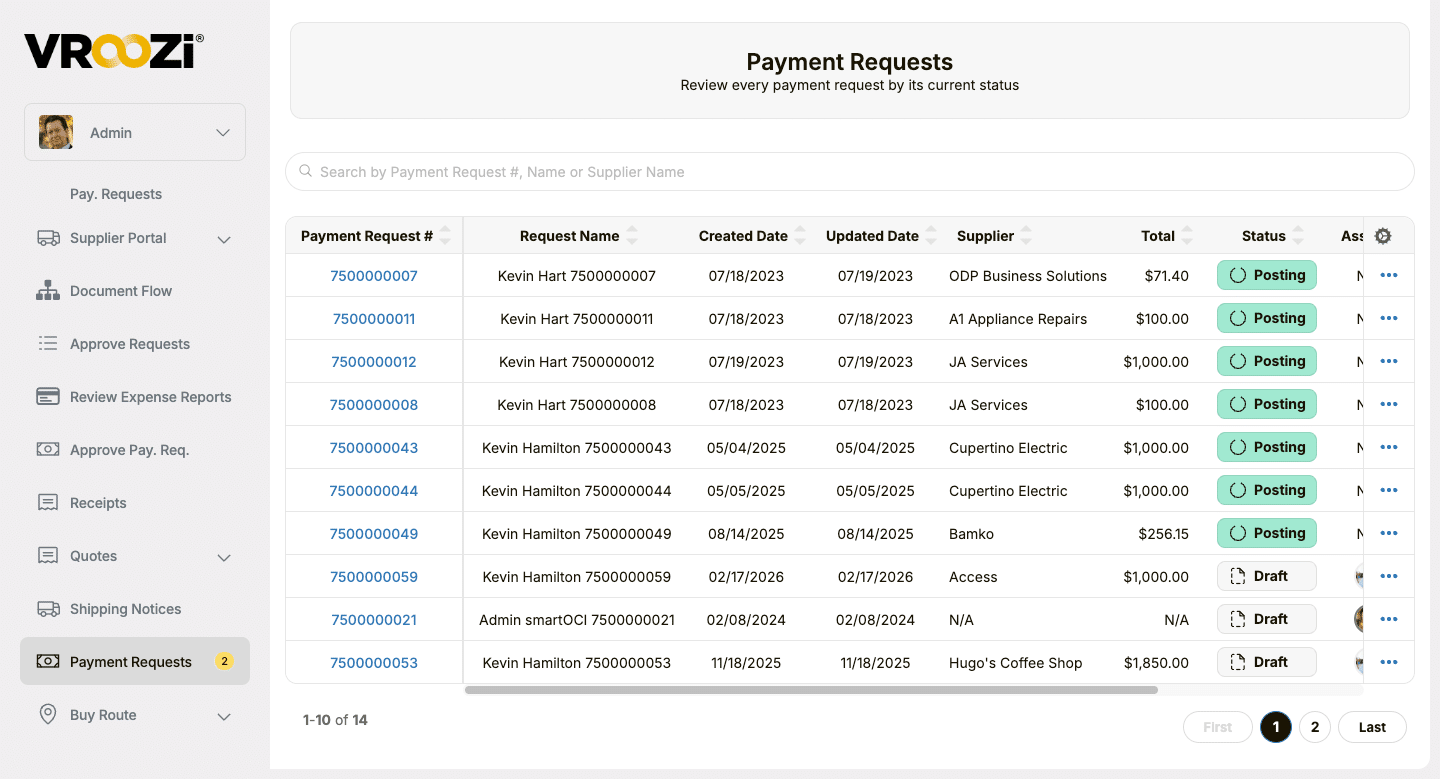
05 / Follow the request
See where a payment request stands.
Review requests by supplier, amount, and current workflow status, including Draft and Posting, so finance can identify what needs follow-up.
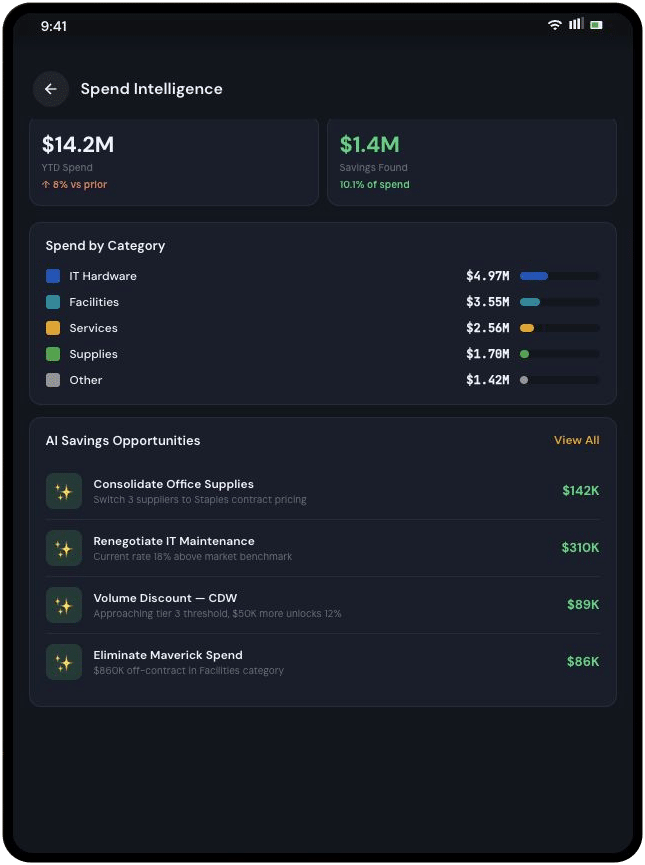
06 / See the patterns
Find the purchases worth discussing across sites.
Review supplier and category activity to see where repeat field purchases may call for a better contract, catalog, or policy path.
One process, different jobs
Give each team a better next step.
Buying should feel simple to the person making the request and useful to the people responsible for policy, budgets, and reporting.
Program teams + engineers
Find what you need.
Use guided buying to select from approved options without hunting through disconnected supplier sites.
Procurement
Shape the buying path.
Manage supplier choices, catalogs, contracts, and the rules that guide a request.
Finance + AP
Keep the context.
Connect purchase details to invoice capture, matching, payments, and spend analysis.
IT + ERP owners
Build on your systems.
Connect purchasing with your current financial environment, whether you run Costpoint, SAP, Oracle, NetSuite, Microsoft Dynamics, or another ERP.
Built for your existing systems
Modern buying, connected to the ERP you run.
Vroozi is designed to connect guided buying, purchasing, and AP data with the ERP, financial, and asset management systems your teams use, including Deltek Costpoint, SAP, Oracle, NetSuite, Microsoft Dynamics, and IBM Maximo. Flexible integrations and APIs help carry purchasing context into your existing environment.
See how guided buying, approvals, purchasing, and AP data can connect to the systems your teams already use.
Vroozi buying ↔ Your ERP
- Approved supplier and catalog access
- Requisition and approval workflows
- Purchasing and AP data connected with financial context
Customer perspective
A faster path for engineers
“Let the engineer click it, buy it, and prototype it right away.”
Frequently asked questions
How it works for A&D teams.
Answers to the questions that tend to come up when teams connect everyday buying, project context, and AP.
What does procure-to-pay mean for aerospace and defense?
Procure-to-pay connects a request to supplier selection, approvals, purchase orders, receipt, invoicing, and payment. For A&D teams, the goal is to give engineers and program staff a usable path for indirect and operational purchases while keeping the policy and financial context that procurement and finance need.
How can engineers buy from approved suppliers and pricing?
Vroozi brings preferred suppliers, catalogs, punch-out options, and negotiated pricing into a guided buying experience. Employees can find the options procurement has made available rather than starting each routine purchase from an email or an unrelated supplier site.
Can approval paths vary by program, role, or budget?
Yes. Teams can configure approval workflows around roles, budgets, policies, and purchase details. The request carries relevant program, project, or cost-center information so approvers can review the purchase in context.
Does Vroozi replace our ERP?
No. Vroozi works alongside your existing ERP or financial system. Vroozi describes integrations with Deltek Costpoint, SAP, Oracle, NetSuite, Microsoft Dynamics, and other systems; the integration design depends on your current environment and the data your teams need to exchange.
Can we see spend by program, project, or cost center?
Vroozi can capture these fields in the purchasing process and bring transaction data into spend reporting. The view your team gets depends on the fields, approval rules, and ERP connections configured for your organization.
How does Vroozi help with invoice processing?
Vroozi supports invoice capture and workflows that compare invoices with purchase orders and receipt records. AP teams can review exceptions with the related purchasing context instead of reconstructing the transaction across separate inboxes and systems.
What purchasing history is available for internal review?
A connected workflow keeps requests, approval decisions, purchase orders, receipts, and invoice activity associated with the transaction. This can make internal reviews easier; your organization remains responsible for its own regulatory and contract requirements.
See what it could look like
Bring program speed and spend control into the same conversation.
Show us how your teams buy today. We’ll walk through how Vroozi can support your suppliers, approval paths, ERP environment, and procure-to-pay goals.
Keep exploring
Explore the next piece of your P2P plan.
Use these guides and solution pages to go deeper on A&D buying, the full procure-to-pay process, and AP automation.
A&D solution overview
See the full procure-to-pay picture for A&D.
Explore guided buying, approvals, AP, payments, and spend visibility in the new overview.
Industry guide
What A&D teams should look for in procurement software.
Read a practical guide to suppliers, workflows, ERP connections, and spend visibility.
Solution / Procure-to-pay
Connect the complete purchasing cycle.
See how Vroozi brings buying, approvals, invoicing, and payments into one P2P process.
Solution / Accounts payable
Get more context into every invoice.
Learn how invoice capture, matching, and AP workflows fit into the process.
Recognized on G2
A buying experience people want to use.
Vroozi’s G2 recognition reflects feedback across implementation, setup, results, and adoption. See what reviewers say about working with Vroozi.